As an Amazon Associate this site earns from qualifying purchases.
Comparison table
| Product | Price | Type | Capacity / size | Mounting | Included pieces |
|---|---|---|---|---|---|
| 3 Pack Cable Management Box | Check price on Amazon | Concealment boxes | L 16.14"x6.14"x5.11", M 12.59"x5.31"x4.52", S 9.25"x4.52"x4.52" | Freestanding | 3 boxes, 10 wire ties, 6 clips (19 pcs) |
| Delamu 2 Pack Cable Management Solution | Check price on Amazon | Raceway channel | 15.7in x 2 | Pre-attached adhesive | 2 raceways |
| Rfiver Table Top TV Stand | Check price on Amazon | TV stand / legs | Holds 150 lbs; 37–90", VESA 200×200–800×600mm | Bolts to TV, sits on surface | Stand, cable fasteners, anti-slip pads |
| CableGenie 10-Pack Cable Clips | Check price on Amazon | Elastic bundle clips | Up to 1" bundle diameter; base 1"x1" | Adhesive, screws or zip ties | 10 clips, 12 pads, 10 screws, 10 ties |
| Lamicall 8 Pack Cord Organizer | Check price on Amazon | Spring-lock clips | 2.5–8mm cable; clip 0.85"x0.85"x0.55" | Acrylic adhesive | 8 clips |
| Cable Management Under Desk (fansto) | Check price on Amazon | Hook-and-loop straps | 15 cables per strap; 120x40mm | Straps alone or adhesive hooks | 20 pairs of straps |
Quick answer: If you want one kit that handles a whole TV wall — power strip, adapters, and the rat's nest behind the console — the 3 Pack Cable Management Box, Metal Mesh Cord Organizer Box for TV Wires, Electrical Hiding, Power Strip – Under Desk Cable Storage Box with Cable Clips&Reusable Cable Ties for HomeOffice - White is the most complete starting point at $10.99. If your problem is specifically the run of cables from the TV down the back of the stand, a raceway like the Delamu 2 Pack Safe & Tidy Cable Management Solution hides that drop cleanly. And if your TV sits on the stand with a wobbly stock foot, the Rfiver Table Top TV Stand with Height Adjustable TV Legs for 37-90 Inch TVs solves the stand and the cable tidying in one purchase.
Here's the honest framing before you buy anything: very few TV stands ship with cable management worth the phrase. Most have a hole cut in the back panel and call it a day. What actually makes a media console look clean is a small set of cheap parts — a box for the power strip, a channel for the vertical drop, and clips to stop cables sagging into view. All of that costs less than $30 combined. Below are the specific pieces worth knowing about, what each one is genuinely good at, and where each one will annoy you.
3 Pack Cable Management Box — Best Overall
This is the piece that does the most visible work. Power strips are the ugliest object in any TV setup, and this set gives you three metal mesh boxes to swallow them: Large at 16.14" x 6.14" x 5.11", Medium at 12.59" x 5.31" x 4.52", and Small at 9.25" x 4.52" x 4.52". The large one is sized for a standard surge protector plus the wall warts hanging off it; the small ones are useful for a single adapter or a charging nest on a side table.
Finding the right best cable management solutions tv stands comes down to matching the features to how you will actually use it.
The mesh construction matters more than it sounds. Solid plastic cable boxes trap heat around power bricks and collect dust in a way that's genuinely irritating to clean. Marbrasse states the mesh design doesn't accumulate dust easily. It also uses a dual-side cable channel design so cords enter and exit from both ends rather than fighting through one slot.
The set is 19 pieces total: the three boxes, 10 self-locking wire ties, and 6 cable clips in three sizes. That's essentially a full starter kit for one media wall for $10.99. If you only buy one thing from this list, buy this.
Delamu 2 Pack Safe & Tidy Cable Management Solution — Best for hiding the vertical cable drop
If your TV is wall-mounted above a console, or your stand has an open back, the ugly part isn't the tangle — it's the two or three cables visibly dangling in mid-air. That's what a raceway fixes. This Delamu kit is 2 pieces at 15.7 inches each, which is enough to cover a typical drop from a mounted TV down to the top of a media console.
The design detail worth noting is the outward-facing opening. Traditional raceways make you feed cables in from an inward slot, which is fiddly when you're working behind a heavy TV in bad light. Outward-facing means you press cables in from the front. Small thing, big difference on installation day.
It's PVC with a flame-retardant design — Delamu states the material chars rather than producing an open flame under extreme conditions, which is a reasonable thing to care about on a wall carrying a live power run. The adhesive is pre-attached and removes without residue, but read the instruction carefully: Delamu says wait 24 hours after installing before loading wires. People who skip that step and hang cables immediately are the ones whose raceway peels off the wall a week later. It also warns the adhesive struggles on powdery or uneven surfaces, so freshly painted or textured walls are a risk.
Rfiver Table Top TV Stand with Height Adjustable TV Legs — Best for TVs sitting on a console
This one's a different category: it replaces your TV's stock feet rather than organizing wires around them. Worth including because a lot of people searching for "TV stand with cable management" actually have a TV whose stock legs are too wide for their console, or sit too low to clear a soundbar.
It's a double T-shaped steel design rated to hold 150 lbs, with 6 height levels at 1.8" per level for up to 8.9" of total adjustment. That range is what lets you raise the panel over a soundbar instead of shopping for a taller console. VESA compatibility runs 200×200 mm up to 800×600 mm, covering 37 to 90 inch flat or curved TVs. Rfiver says assembly takes about 15 minutes with the included hardware and no drilling.
On the cable side, each package includes sticky cable fasteners for routing wires behind the TV, plus non-slip pads on the feet to protect the console surface. Rfiver also notes you can set speakers on the feet of the stand, with shock-absorbing anti-slip stickers supplied for that purpose. It's not a comprehensive cable system — pair it with a box or clips — but for $29.98 you're solving mounting height and basic wire tidying together.
Rfiver Table Top TV Stand with Height Adjustable TV Legs for 37-90 Inch TVs
CableGenie 10-Pack Adjustable Elastic Adhesive Cable Clips — Best for thick cable bundles
Where the small clips fall down is bulk. Behind a TV you often have a bundled group — power, two HDMI, an optical cable — that no single-cable clip will hold. CableGenie's elastic loop handles up to 1 inch diameter, which is enough for that whole bundle in one clip.
The pack includes 10 clips, 12 adhesive pads (2 spares for repositioning), 10 screws, and 10 zip ties. That three-way mounting kit is the real selling point: adhesive for flat console backs and walls, screws when you want permanence, zip ties for irregular shapes like furniture legs and stand uprights — exactly the things behind a TV stand that adhesive won't grip.
The clip body is impact-resistant ABS with a hook design for one-handed operation, and the 2026 revision uses a white silicone elastic loop for longer-lasting flexibility and UV resistance, on a larger 1" x 1" square base for better attachment. Reusability matters here too — you can swap cables freely instead of cutting zip ties every time you change a device. At $17.20 it's the priciest item here, so buy it because you need the bundle capacity, not as a default.
[CableGenie [Made in the UK] 10-Pack Adjustable Elastic Adhesive Cable Clips, Wire Management Holder, Cord Organizer for Home Office, Under Desk, Behind TV, Phone Charger, Laptop, PC, HDMI, USB (Black)](https://www.amazon.com/dp/B0GHP439B2?tag=mediafurnish-20)
Lamicall 8 Pack Cord Organizer — Best for single cables you unplug often
Different job entirely. These are for the cables you actively use — the charger you grab off the console, the HDMI you swap between a console and a laptop. The spring-lock mechanism with a 60° rotation shaft and angled opening is built for one-handed clip-in and pull-out, which is the whole point when you're doing it daily.
The slot takes 2.5–8mm diameter, so USB-C, Lightning, HDMI, USB, mouse, keyboard, headphone and TV cables all fit. Each clip is 0.85" x 0.85" x 0.55" and weighs 3g, small enough to tuck into the corner of a stand where it disappears. Lamicall uses acrylic adhesive rather than standard tape, and says it peels off without residue — relevant on a nice wood console.
One instruction people ignore: wait 30 minutes after sticking before loading cables. It's ABS plastic rather than rubber, so the spring should hold its snap longer than a soft-material clip.
[Lamicall 8 Pack Cord Organizer, [1s Lock] Cable Management Clips](https://www.amazon.com/dp/B0DBVCL44N?tag=mediafurnish-20)
Cable Management Under Desk, Enhanced up to 15 Cord Organizer 20 Pair-Black — Best budget bulk option
The cheapest way to tame a large tangle. This is 20 pairs of 120x40mm hook-and-loop straps, each rated to hold up to 15 cables. At $9.99 that's a lot of strapping capacity — enough for a full media wall plus the desk and still have spares.
The straps work alone or with adhesive hooks for mounting under a surface, which is how you'd use them on the underside of an open-back media console. The segmented design lets you adjust one section without pulling the whole run apart, and the low profile fits tight corners. Fansto specifies reinforced hook-and-loop with a self-locking adjustable design so the strap doesn't loosen under weight, and acrylic adhesive pads that come off residue-free from wood, glass and tile.
Same rule as the others: fansto says wait 2 hours after applying the adhesive hooks before loading cables. Note this is straps and hooks, not a rigid channel — it bundles cables together but doesn't conceal them behind a cover. For an open-back stand where the bundle is visible, pair it with a box.
Cable Management Under Desk, Enhanced up to 15 Cord Organizer 20 Pair-Black
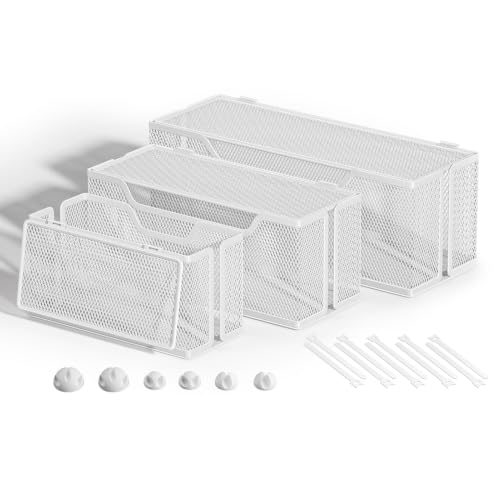
- 【Three Sizes Cable Management Boxes】Say goodbye to tangled cords and clutter with our three-size cable management boxes, designed to safely conceal power strips, chargers
- 【19 PCS Cable Management Set】--Are you feel worried and tired of messy cables? this cable organizer set is a good item for you. You will get three power strip boxes, LARGE,MEDIUM
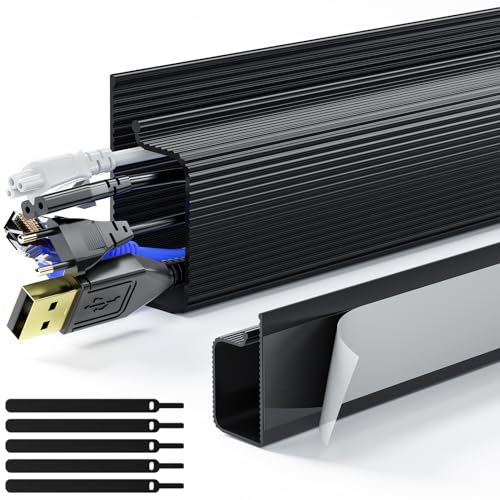
- 【Worry-Free Cable Management Solution】This cable management under desk offers a simple and effective way to manage wires in both home and office settings. The primary function of
- 【Thoughtful Adhesive Design】With pre-attached adhesive tape, installation complexities are eliminated. Simply choose a smooth surface, peel off the backing film, and apply with
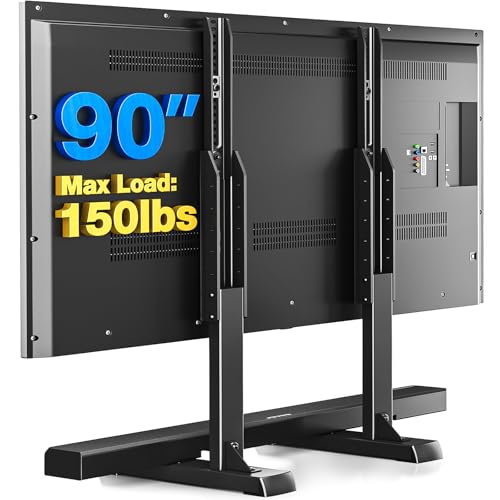
- STABILITY IS SAFETY - HOLDS UP TO 150 LBS: Our professional team designed this double T-shaped TV stand using thickened high-strength steel and triangular support structure
- HEIGHT ADJUSTMENT - MEETS YOUR VARIOUS HEIGHT NEEDS: Our table top TV stand is designed with 6 levels of height adjustment (1.8" per level), and the total height can be adjusted
![CableGenie [Made in the UK] 10-Pack Adjustable Elastic Adhesive Cable Clips, Wire Management Holder, Cord Organizer for Home Office, Under Desk, Behind TV, Phone Charger, Laptop, PC, HDMI, USB (Black)](https://mediafurnish.com/aimg/images/I/51lGEjLTrIL._SL500_.jpg)
- INCLUDED IN THE PACK: 10 CableGenie Cable Tidying Clips, 12 Adhesive Pads (2 spare for repositioning), 10 Screws, and 10 Zip Ties
- QUICK, EASY, ADJUSTABLE, RELIABLE: The elastic loop securely holds anything from a single charger on your bedside nightstand to a big bunch of cords (up to 1 inch diameter) under
![Lamicall 8 Pack Cord Organizer, [1s Lock] Cable Management Clips](https://mediafurnish.com/aimg/images/I/41MHdY3ncDL._SL500_.jpg)
- 【1s Spring-Lock Design】Our cord holder clips feature an innovative 𝐬𝐩𝐫𝐢𝐧𝒈 𝐨𝐩𝐞𝐧-𝐜𝐥𝐨𝐬𝐞 mechanism, combine with the unique design of the spring's 60° rotation shaft
- 【8mm Widened Slot for Universal Fit】With a diameter range of 2.5-8mm (0.1"-0.32"), our cable management organizer clips can organize a wide variety of wires, including Type-C
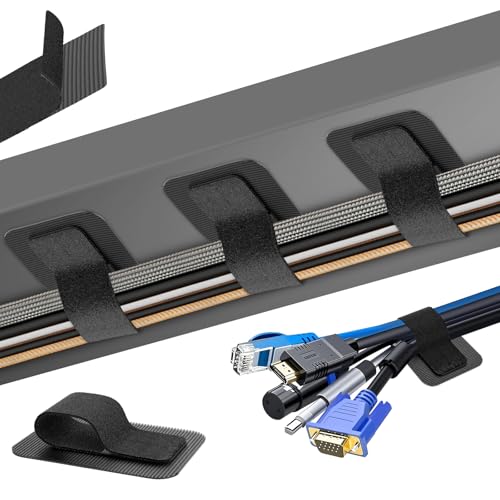
- 【Under-Desk Cable Management】Tired of tangled cables under your desk? This cable organizer includes 20 pairs of 120x40mm hook-and-loop cold holder. Fansto cable management under
- 【Narrow-Space Cable Hider】The flexible segmented design allows easy adjustments without removing the entire unit, making installation hassle-free. Its low-profile design fits
How to choose
Start by naming your actual problem. These six products solve four different problems and people buy the wrong one constantly.
- A visible power strip and a pile of adapters you need a box. The Marbrasse three-box set.
- Cables dangling in mid-air between a mounted TV and the console you need a raceway. The Delamu.
- A messy but hidden bundle behind a closed-back stand you need straps or clips. Fansto for volume, CableGenie for thick bundles.
- A cable you unplug every day you need a quick-release clip. Lamicall.
- A TV that sits too low or has feet too wide for the console the Rfiver, which brings basic cable fasteners along.
Respect the cure times. Delamu says 24 hours, fansto says 2 hours, Lamicall says 30 minutes. These aren't marketing padding — loading weight onto adhesive before it fully bonds is why people end up rebuying.
Match the clip to the cable diameter. Lamicall handles 2.5–8mm, which covers individual cables. CableGenie goes to 1 inch, which covers bundles. If you buy the small clips expecting them to hold four cables at once, they won't.
Think about heat. Power bricks get warm. The Marbrasse boxes are metal mesh, which Marbrasse notes resists dust accumulation, and mesh generally breathes better than a sealed plastic box.
Household safety is a real criterion, not a marketing line. Delamu positions its raceway around keeping cables away from kids and pets, and specifies flame-retardant PVC. Marbrasse frames its boxes the same way — plugs out of reach, nothing to trip over. If you have a toddler or a cable-chewing cat, those two get priority over the clips.
Before you commit, go read the current customer reviews on each listing yourself, particularly for adhesive longevity on your specific surface type — that's the variable that differs most between homes.
FAQ
Do I need more than one of these? Probably, and that's fine given the prices. A realistic TV wall setup is one box for the power strip plus one raceway for the drop, or one box plus a handful of clips — roughly $20 total. No single product on this list handles concealment, routing and retention at once.
Will the adhesive damage my wall paint or console finish? Delamu, fansto and Lamicall all state their adhesive removes without residue. That's a claim about residue, not about paint — freshly painted or delicate finishes are always some risk with a strong acrylic adhesive. CableGenie ships screws and zip ties as alternatives, so use those where you can't risk adhesive.
Can these hold a heavy HDMI or power cable behind a TV? Depends which one. CableGenie's elastic loop takes bundles up to 1 inch diameter and offers screw mounting for maximum hold. Lamicall tops out at 8mm per cable. Fansto's straps hold up to 15 cables each. Match the spec to what you're actually holding.
Does the Rfiver stand work with a soundbar? It has 6 height levels at 1.8" each for up to 8.9" of total adjustment, so raising the panel to clear a soundbar is exactly what that range is for. Rfiver also notes speakers can sit on the feet of the stand, with shock-absorbing anti-slip stickers supplied.
Related guides
- Common Reasons Best TV stands and media furniture - TV stands, entertainment centers, media consoles, TV wall mounts, floating media shelves, gaming desks, audio racks, cable management Gets Denied
- FAQ: Best TV stands and media furniture - TV stands, entertainment centers, media consoles, TV wall mounts, floating media shelves, gaming desks, audio racks, cable management
- How to Lower Your Best TV stands and media furniture - TV stands, entertainment centers, media consoles, TV wall mounts, floating media shelves, gaming desks, audio racks, cable management Costs
Key Takeaways
- Choosing the right best cable management solutions tv stands means matching the key features to your specific needs and budget
- Read real customer reviews and check the return policy before you commit
- Compare value across models — the priciest option is not always the best fit