As an Amazon Associate this site earns from qualifying purchases.
Comparison table
| Desk | Price | Width | Shape | Power built in | RGB control | Storage |
|---|---|---|---|---|---|---|
| AODK 63 inch Gaming Desk with PC Display Stand | Check price on Amazon | 63" | Rectangular + shelf tower | Not stated | LED strip under monitor shelf | 3 built-in drawers, side display shelf |
| AODK Gaming Desk w/PC Showcase Stand, 59" | Check price on Amazon | 59" | Rectangular + shelf tower | Not stated | LED strip under monitor shelf | 3 fabric drawers, side display shelf |
| ODK 53" L Shaped Gaming Desk | Check price on Amazon | 53" (18.9"D, 29.8"H) | L-shaped, reversible | 3 AC outlets, 2 USB | 10 colors, 8 brightness, 10 modes, memory | Dual shelves, CPU stand, hook, tool bag |
| Casaottima 48" Gaming Desk | Check price on Amazon | 48" | Rectangular + hutch | USB ports | Multiple colors, brightness, effects | Hutch, tiered shelves, 3 fabric drawers |
| Korfile 40 Inch Gaming Desk | Check price on Amazon | 40" | L-shaped, reversible | 3 AC outlets, 2 USB | App-controlled strip | 3 tiers of shelves, cup + headphone holder |
| AODK 48 Inch Gaming Desk | Check price on Amazon | 48" | Rectangular + side shelf | Not stated | 10 static colors, 10 dynamic modes | Adjustable 2-height shelf, CPU stand |
Quick answer: If you've built a showpiece PC and want it displayed rather than shoved under the desk, the AODK 63 inch Gaming Desk with PC Display Stand is the one to beat at $149.99. If you're squeezing a full setup into a bedroom corner, the L-shaped Korfile 40 Inch Gaming Desk with Power Outlet & LED Lights at $75.99 does the most with the least floor space. And if you just need a solid, cheap surface with a monitor shelf, the AODK 48 Inch Gaming Desk with LED Lights & CPU Stand covers it for $69.99.
Every desk here sits under $150, which is the price band where "gaming desk" actually means something specific: a monitor riser, a place for the tower, RGB, and usually some combination of drawers, shelves and built-in outlets. Below is what separates them, and who each one is actually for.
AODK 63 inch Gaming Desk with PC Display Stand — Best Overall
At 63 inches wide, this is the largest desk on the list and the only one built around a tiered stand meant to hold a tempered-glass "fish tank" case at eye level. AODK specifically calls out compatibility with the Lian Li O11 and Hyte Y60 — the two cases people buy precisely because they want the internals visible. Putting one of those on the floor defeats the entire point.
Finding the right best gaming desks console pc setups comes down to matching the features to how you will actually use it.
The structure is an industrial steel frame with a thick desktop board, and AODK states the elevated stand is tested to support heavy full-tower cases without wobbling. That "full-tower" wording matters and is the main spec difference between this and the 59-inch model below.
Storage is three built-in drawers plus a side display shelf with an overhead top board, sized for figures, Funko Pops or a speaker. There's an RGB LED strip under the monitor shelf. The whole thing is reversible, so the shelf tower can sit on either side depending on how your room is laid out.
At $149.99 it's the most expensive pick here, and the reason to pay it is width plus full-tower support. If your case is a mid-tower and 59 inches is enough, save the money.
AODK Gaming Desk w/PC Showcase Stand, 59" — Best for Mid-Tower Showcase Builds
This is the same concept as the 63-inch model, four inches narrower, thirty dollars cheaper. Same elevated showcase stand for panoramic glass cases, same RGB strip under the monitor shelf, same side display shelf with overhead top board, same reversible layout, same industrial steel frame.
Two real differences. First, the three drawers here are fabric rather than the built-in drawers on the 63-inch version — fine for cables and controllers, less rigid. Second, and more important, AODK describes the stand as tested for heavy middle-tower cases, not full-tower. If you're running a full-tower build, that's a reason to step up rather than save the $30.
For the very common setup — a mid-tower with a glass side panel, one or two monitors, and a desire to actually see the RGB you paid for — this is the efficient buy at $119.99.
AODK Gaming Desk w/PC Showcase Stand, 59" Reversible, RGB LED, Black
ODK 53" L Shaped Gaming Desk — Best for Dual Monitors on a Budget
The ODK is the widest L-shape here at 53"W x 18.9"D x 29.8"H, and ODK positions that surface specifically for dual-monitor configurations. If you run two screens and don't want them crowding each other, this is the cheapest way to get there at $89.99.
It's genuinely well-equipped for the price: 3 AC outlets and 2 USB ports built in, cable management channels, dual shelves, a CPU stand, an accessory hook and a tool bag. The RGB strip has 10 color presets, 8 brightness grades, 10 dynamic modes and a memory function, so it comes back on the way you left it.
Stability comes from an X-shaped steel frame plus adjustable foot pads for uneven floors — worth noting because L-shaped desks are the ones most prone to rocking at the corner. The side modules are interchangeable left or right.
The tradeoff versus the AODK showcase desks: your tower sits on a CPU stand, not on a display platform at eye level. This is a workstation, not a stage.
ODK 53" L Shaped Gaming Desk with Shelves, LED & Outlets, Black
Casaottima 48" Gaming Desk with Shelves, Hutch & 3 Drawers — Best for Teens and Dorm Rooms
Casaottima built this one as a study desk that moonlights as a gaming desk, and it's honest about it: homework and online classes by day, gaming at night. At 48 inches with a reversible shelf design, it's meant for bedrooms and dorms.
The standout spec is the PC shelf — 11.6 inches wide, which Casaottima says fits most ultrawide and full-tower cases. That's unusually generous for a 48-inch desk, and it means a big case doesn't force you up to a wider model. Above the desktop you get an overhead hutch, multi-tier display shelves and dedicated headset storage, so the vertical space does real work.
There's an elevated monitor stand to bring the screen to eye level, built-in RGB with multiple colors, brightness levels and dynamic effects, integrated USB charging ports, and three fabric drawers.
At $89.99 it's the same price as the ODK. Choose this if you want enclosed storage and a hutch; choose the ODK if you want raw surface width and AC outlets.
Casaottima 48" Gaming Desk with Shelves, Hutch & 3 Drawers, Computer Desk
Korfile 40 Inch Gaming Desk with Power Outlet & LED Lights — Best for Small Spaces
Forty inches is small, and that's the point — this is a corner desk for rooms where a 53- or 63-inch slab simply won't fit. Korfile packs in 3 tiers of storage shelves, a monitor stand long enough to hold two 24" monitors or one large one, a cup holder and a headphone holder.
Power is well handled for the price: 3 AC sockets and 2 USB charging ports. The RGB strip is app-controlled, which is the only phone-controlled lighting in this group; the others use physical controls or presets.
The surface is MDF with a carbon fibre texture that Korfile describes as smooth, scratch-resistant and easy to clean. The L-shape flips left or right, and Korfile notes two units can be combined into a U-shaped setup if you ever want to expand or you're outfitting a shared room.
At $75.99 it's the second-cheapest here and the one to pick when floor space, not budget, is the binding constraint.
AODK 48 Inch Gaming Desk with LED Lights & CPU Stand — Best Budget Pick
The cheapest desk here at $69.99, and it skips the features that inflate price elsewhere — no outlets, no drawers, no hutch — in favor of getting the fundamentals right.
You get a full-length monitor shelf spanning the whole desktop, which is more usable than a short center riser if you run multiple screens or like to park speakers up top. The storage shelf mounts on either side, and its upper shelf adjusts to two heights, so you can size the CPU slot to your case and keep controllers and discs on the level below.
The tabletop is carbon fiber textured and described as scratch-resistant, anti-collision and waterproof, on a thick metal frame. AODK includes all assembly tools and instructions.
If you're building a console setup or a first PC and want a desk that looks the part without eating the GPU budget, start here.
AODK 48 Inch Gaming Desk with LED Lights & CPU Stand, Carbon Fiber Black
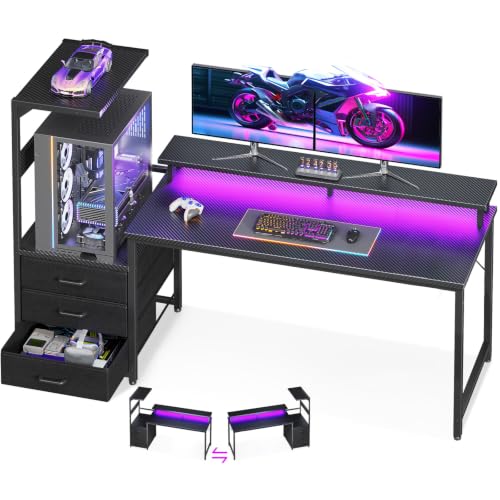
- DESIGNED FOR PANORAMIC "FISH TANK" CASES: Unlike standard desks that hide your rig, our exclusive elevated desktop stand is engineered to be the ultimate stage for your premium
- IMMERSIVE RGB AMBIENCE SYSTEM: Elevate your gaming experience with our integrated RGB LED lighting strip underneath the monitor shelf. Designed to sync visually with your PC's
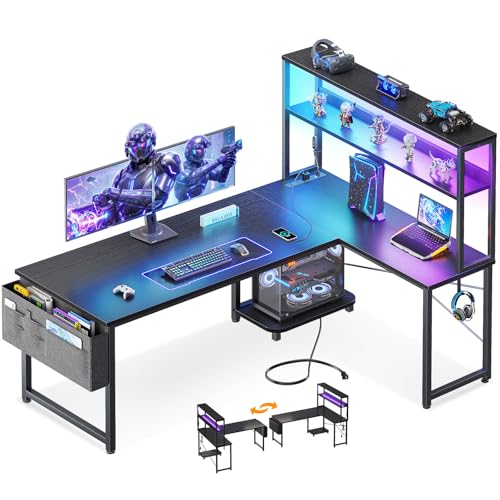
- 【Computer Desk with Powerful Storage Function】This L-shaped computer desk features integrated storage solutions: dual shelves, a CPU stand, an accessory hook, and a tool bag
- 【Built-in USB Charging Ports & Power Outlets 】Equipped with 3 AC outlets and 2 USB ports, providing centralized power access for desktop equipment and mobile devices. Cable
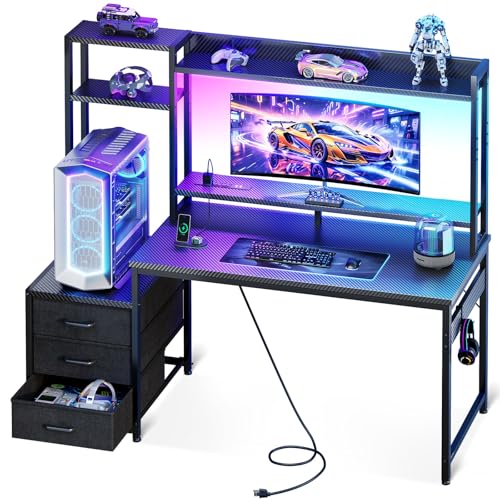
- 【Complete Gaming Setup in One Desk】Featuring an overhead hutch, multi-tier display shelves and a headset hook, this PC gaming desk keeps your gaming gears stored while showcasing
- 【Upgraded PC Tower Shelf】The 11.6-inch-wide PC shelf fits from most small to mid-tower PC Cases, let you display your gaming rig instead of stashing it under the desk. An elevated
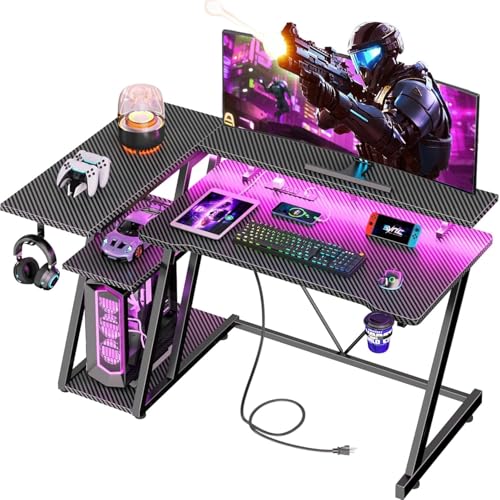
- Carbon fibre texture: Our PC gaming desk is made from MDF with a carbon fibre textured finish, giving a smooth, scratch-resistant surface that feels great to the touch and is easy
- Reversible design: The L-shaped gaming desk can be flipped left or right to suit different room corners, and 2 can be combined into a U-shaped table for double play, making it a
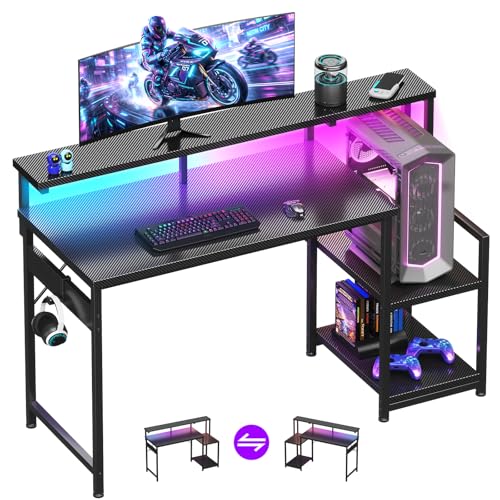
- Desk with LED Lights: This computer gaming desk features an LED light strip under its monitor shelf, offering 10 static colors and 10 dynamic modes. By adjusting different colors
- Reversible & Adjustable Storage Shelf: This gaming desk features a versatile storage shelf that can be installed on either the left or right side based on your preference. The
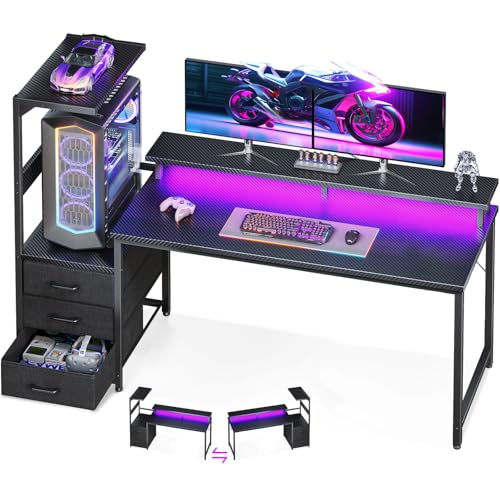
- DESIGNED FOR PANORAMIC "FISH TANK" CASES: Unlike standard desks that hide your rig, our exclusive elevated desktop stand is engineered to be the ultimate stage for your premium
- IMMERSIVE RGB AMBIENCE SYSTEM: Elevate your gaming experience with our integrated RGB LED lighting strip underneath the monitor shelf. Designed to sync visually with your PC's
How to choose
Decide where the tower goes first. This is the single biggest fork in the road. If you own a glass-panel case, the two AODK showcase desks are built to put it at eye level; nothing else here does that. If your case is plain or you'd rather keep the desktop clear, the CPU stand on the ODK or the adjustable shelf on the AODK 48 is the better use of space. And check tower size against the spec: the 63-inch AODK cites full-tower support, the 59-inch cites middle-tower, and Casaottima's 11.6-inch shelf is stated to fit most ultrawide and full-tower cases.
Measure the wall, then the corner. Widths here run from 40 to 63 inches. An L-shape like the Korfile or ODK buys you surface area without buying wall length, but it needs a corner and it commits you to a left or right orientation — both are reversible, so that's a setup decision rather than a purchase decision.
Count your plugs. Only the ODK and Korfile have AC outlets on the desk (3 each, plus 2 USB). Casaottima has USB charging but AC outlets aren't stated. The two AODK showcase desks and the AODK 48 don't state built-in power at all. If you're tired of reaching behind a dresser to plug in a controller, that narrows the field fast.
Be realistic about RGB. All six have it. Only the Korfile has app control. The ODK's controller is the most granular on paper — 10 presets, 8 brightness grades, 10 dynamic modes, plus a memory function so it remembers your last setting. None of these are advertised as syncing to your PC's software; they're independent light strips that you match by eye.
Assembly and stability. These are flat-pack desks. The ODK includes adjustable foot pads for uneven floors and an X-frame, AODK's models cite steel frames, and both AODK and ODK include tools and support contacts. Before you buy, go read recent owner reviews on the product page yourself — assembly quality and wobble are exactly the things buyers report on, and they're worth ten minutes of your time.
FAQ
Do I need a standing desk for gaming? None of the desks in this roundup are height-adjustable, and no sit-stand capability is stated for any of them. If a motorized or crank-adjustable frame is a hard requirement for you, this list won't cover it — you'll be shopping a different category and a higher price band.
Will these fit two monitors? The ODK's 53-inch top is described by ODK as ideal for dual-monitor configurations, and Korfile states its monitor stand holds two 24" monitors or one large screen. The 59- and 63-inch AODK desks give you the most raw width. On the 48-inch models, two monitors will fit but you'll be tight.
Are these good for console setups too? Yes. The shelving that holds a PC tower works just as well for a console, and the storage on the Casaottima and Korfile — headset holders, drawers, tiered shelves — is console-agnostic. The one thing to note is that the AODK showcase stands are specifically engineered around tall glass PC cases, so their main selling point is wasted if you're on console.
Which one is best under $100? Four of the six are: the ODK 53" and Casaottima 48" at $89.99, the Korfile at $75.99, and the AODK 48 Inch at $69.99. Pick the ODK for width and outlets, the Casaottima for enclosed storage and a hutch, the Korfile for a tight corner, and the AODK 48 for the lowest price with a full-length monitor shelf.
Related guides
- Privacy Policy
- Common Reasons Best TV stands and media furniture - TV stands, entertainment centers, media consoles, TV wall mounts, floating media shelves, gaming desks, audio racks, cable management Gets Denied
- Best TV stands and media furniture - TV stands, entertainment centers, media consoles, TV wall mounts, floating media shelves, gaming desks, audio racks, cable management After Recent Issues
Key Takeaways
- Choosing the right best gaming desks console pc setups means matching the key features to your specific needs and budget
- Read real customer reviews and check the return policy before you commit
- Compare value across models — the priciest option is not always the best fit