As an Amazon Associate this site earns from qualifying purchases.
Specification comparison
| Product | Price | Tiers | Stated capacity | Shelf material | Stated size |
|---|---|---|---|---|---|
| suptek Glass Floating Shelf (1 Tier) | Check price on Amazon | 1 | 17.6 lbs (8 kg) | Tempered glass + powder-coated aluminum | Not stated |
| Ardier Wall-Mounted Projector Shelf | Check price on Amazon | 1 | 24 lbs | 0.9" board + powder-coated steel brackets | Fits items up to 15.94" × 9.84" |
| Mount-It! Floating Wall Shelf | Check price on Amazon | 1 | 22 lbs | 5mm tempered glass + steel frame | 14.2" × 10.2" × 2" |
| Suptek Glass Floating Shelves (2-Tier) | Check price on Amazon | 2 | 17.6 lbs (8 kg) per shelf | Tempered glass + powder-coated aluminum | Not stated |
| WALI Floating TV Shelf (CS303N) | Check price on Amazon | 3 | 22 lbs (10 kg) | Walnut brown shelf | 13.78" × 11.02" × 0.59" each |
| Snughome Floating TV Stand 55" | Check price on Amazon | Drawers + open shelf | 180 lbs | Particle board + metal frame | 55.1"L × 11"W × 9.2"H |
Quick answer: For most people, "building" a floating media shelf means mounting a purpose-made bracket-and-shelf kit rather than cutting lumber — the hardware is engineered for the load and the cable routing is already solved. If you just need a home for a cable box, console or router, a single tempered-glass unit like the suptek Glass Floating Shelf, 1 Tier Media Shelf for TV Accessories, Flat Black Wall Mount Bracket, 17.6lbs Weight Capacity, Quick Installation, Cable Management, Custom Style, Backless does the job for under $20. If you want the shelf to replace a TV stand entirely, you need something far wider with a real weight rating.
The hard part of a floating shelf is never the shelf. It's the wall. Everything below assumes you'll find out what's behind your drywall before you drill.
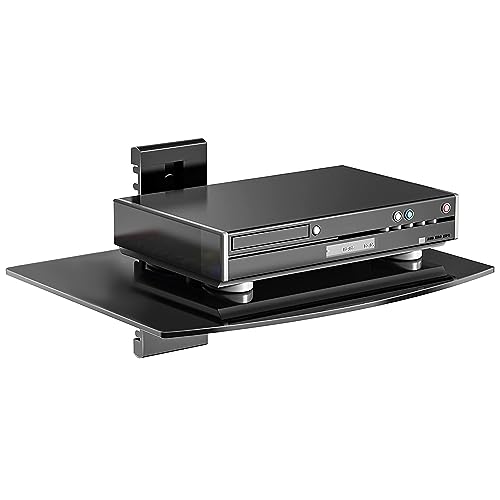
- EASY EXPANSION: The tv floating shelves wall mounted AV rack’s interlocking brackets make it easy to join multiple units together, giving you the freedom to add as many as needed
- HEIGHT ADJUSTABLE: Post-installation height adjustments can be made to the wall mounted AV rack to ensure your devices are exactly where you want them. Position the AV wall
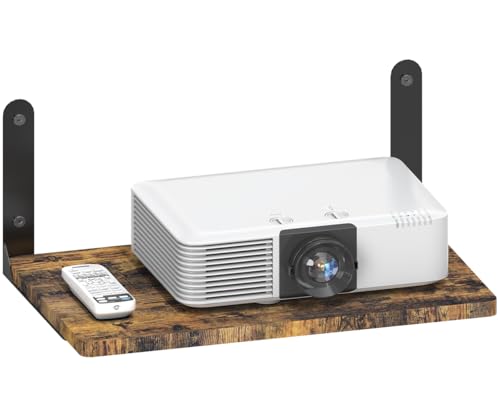
- Stylish Shelf & Versatile Storage: This robust floating shelf for projector is designed to fit items up to 15.94 × 9.84 inches. Crafted from 0.9-inch thick board, the hanging
- Open-Design & Space-Adaptive Shelf: The open design of the floating projector organizer promotes efficient heat dissipation for electronic devices, extending their lifespan
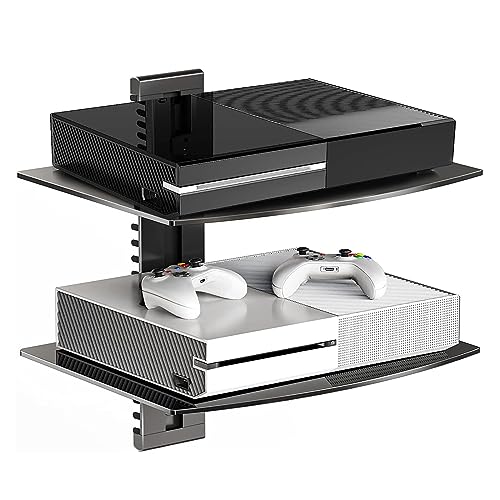
- EASY EXPANSION: The tv floating shelves wall mounted AV rack’s interlocking brackets make it easy to join multiple units together, giving you the freedom to add as many as needed
- HEIGHT ADJUSTABLE: Post-installation height adjustments can be made to the wall mounted AV rack to ensure your devices are exactly where you want them. Position the AV wall
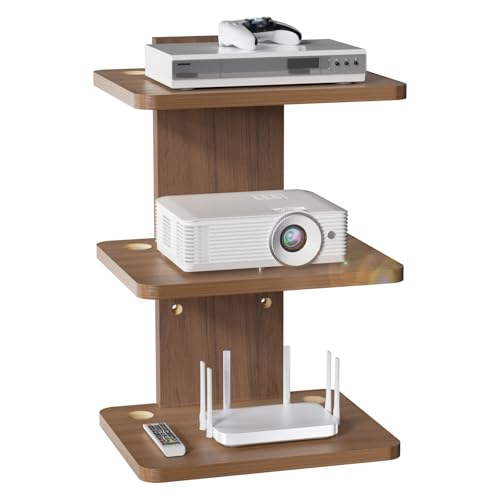
- ENHANCED FEATURES: Sturdy walnut brown floating shelf, 13.78" x 11.02" x 0.59", supports up to 22lbs (10kg). Perfect as a
- EFFICIENT CABLE MANAGEMENT: Two side wire holes route and hide cables. Keeps your projector and device wires tidy, reducing clutter and simplifying access to connections
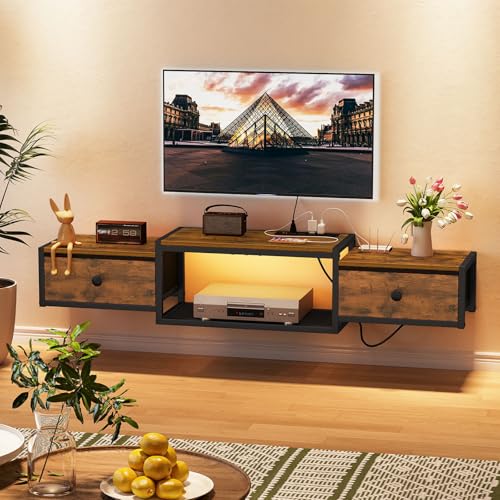
- Wall Mounted TV Stand with Power Outlets: Featuring 4 AC power outlets, 2 USB ports, and a 4.9-foot power cord, this floating TV stand provides convenient power access for your
- Ample Storage Saves Space: Measuring 55.1"L x 11"W x 9.2"H, this wall-mounted entertainment center fits TVs from 32" to 65". The floating design saves valuable floor space, while
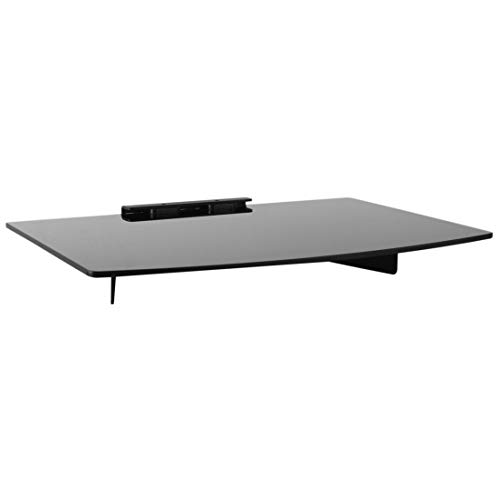
- TRANSFORM YOUR ENTERTAINMENT SPACE WITH A FLOATING DESIGN – Upgrade your home with this sleek, space-saving wall-mounted AV shelf. Measuring 14.2" x 10.2" x 2", it’s perfect for
- SUPERIOR STRENGTH & SAFETY – HOLDS MORE WEIGHT THAN COMPETITORS – Don’t settle for flimsy shelves! Our reinforced solid steel frame and premium 5mm thick tempered glass provide a
The actual build process
1. Decide what's going on it, then weigh it. A PS5 is roughly 9 lbs bare; a bulky AV receiver can be 25 lbs or more. Every shelf here states a capacity, and those numbers are not suggestions. The suptek units state 17.6 lbs per shelf. The Ardier states 24 lbs. The Mount-It! states 22 lbs. If your gear is close to the limit, go up a class rather than hoping.
Finding the right how to build a floating media shelf comes down to matching the features to how you will actually use it.
2. Find out what your wall is made of. This is the step that decides everything else. The suptek plate is stated to mount to a single wood stud, concrete, or drywall. The Mount-It! is stated to work on wood, concrete and brick. The Ardier uses expansion screws and is stated as suitable for marble, tile, painted walls, plaster, wood and cement. The Snughome is explicit in the other direction: it can be installed on concrete, wood and brick walls, but not on cavity walls or gypsum board. Read that line twice before you buy a 55-inch console for a stud-framed wall.
3. Mark your height off the TV, not off the floor. Standard practice is to keep the shelf far enough below the TV that the display's bottom bezel doesn't crowd it and IR remotes still reach. Measure with the TV already mounted if you can.
4. Level, drill, mount the plate, then hang the shelf. Bracket-style kits are two-stage by design: plate first, shelf second, which is why one person can do this. The suptek design is height-adjustable after installation — brackets slide along the track and lock with the included wrench — which is a genuinely useful hedge if you're not certain about spacing.
5. Route the cables before you set the gear down. Both suptek units route cables along the wall plate with openings in the end caps and along the sides. The WALI has two wire holes, one on each side. The Mount-It! has a built-in cable routing system. Doing this after the console is in place is miserable.
Who this approach is for
- You rent, or you don't want to commit to a floor-standing console.
- You've already wall-mounted the TV and the gear underneath now looks orphaned.
- Your floor space is genuinely tight — a bedroom, a studio, a small office.
- You want airflow around a console. The Ardier's open design is specifically pitched at heat dissipation, and open shelving genuinely does better than a closed cabinet for a console that runs hot.
- You want the cable run to look intentional rather than improvised.
Who should skip it
- Anyone with heavy, deep AV gear. A full-size receiver on a 14" × 10" glass shelf is a bad idea on both counts — weight and overhang.
- Anyone whose wall is a mystery. Old plaster with unknown backing, thin hollow-core partition walls, or anything you can't verify — the failure mode here is expensive.
- People who move often. You're leaving holes.
- Anyone who needs enclosed storage. Of the options here, only the Snughome offers drawers; the rest are open shelves and everything on them is on display.
- Anyone with small kids or an enthusiastic cat, if you're leaning toward glass. Tempered glass is strong but it's still a hard edge at head height for a toddler.
The honest trade-offs
Glass vs. wood. The suptek and Mount-It! shelves use tempered glass, which looks light and disappears against a wall. It also shows every fingerprint and dust mote, and it's visually cold. The WALI's walnut brown finish and the Ardier's wood-and-steel construction read warmer but are more visible as objects.
Capacity vs. price. The Ardier is the cheapest here at $14.94 and states the highest single-shelf capacity of the small units at 24 lbs. That's an unusual combination and worth a look, though its brackets are triangular and visible rather than hidden.
Modular vs. fixed. The suptek system's selling point is interlocking brackets that let you join units and add tiers later. That's real flexibility if your setup is still evolving. The trade-off is that a multi-unit suptek install has more alignment steps than a single fixed shelf.
Small shelf vs. real console. The Snughome at $63.64 is a different category of thing: 55.1" wide, fits 32"–65" TVs, 180 lbs stated capacity, four AC outlets, two USB ports, a 4.9-foot cord, RGB LED strips with 20 colors and remote control, and hidden drawers. It's a floating entertainment center, not a shelf. It's also the one with the strictest wall requirement.
What to check on the listing before you buy
Listings change, and specs get quietly revised. Before you commit:
- Current price and variant. The WALI listing is sold in shelf-count and finish variants — confirm you're on the 3-shelf walnut brown option and not a single-shelf SKU at a similar price. The suptek 1-tier and 2-tier are separate listings entirely.
- Wall compatibility, restated in the current bullets. This is the spec most likely to have changed and the most likely to ruin your weekend.
- What hardware is actually in the box. Most of these state that all necessary hardware is included; the Snughome states six expansion screws. Confirm on the live listing rather than assuming.
- Warranty and support terms. Both suptek and WALI reference 24-hour customer service response; treat that as a claim to verify, not a guarantee.
- Recent customer reviews and Q&A. Go read them yourself, filtered to recent and to your wall type. That's where installation surprises surface.
- Shelf dimensions against your gear's actual footprint. Measure your console. A PS5 laid flat is wider than many of these shelves are deep.
Consider instead if…
Ardier Wall-Mounted Projector Shelf, Wooden Media Holder Holds Up to 24 lbs, Floating Entertainment Shelves Furniture for Cable Box, WiFi Router, TV Box, Game Console, DVD Player, Black — consider instead if…
…you want the highest single-shelf weight rating for the lowest price, and you'd rather have wood than glass. The Ardier Wall-Mounted Projector Shelf, Wooden Media Holder Holds Up to 24 lbs, Floating Entertainment Shelves Furniture for Cable Box, WiFi Router, TV Box, Game Console, DVD Player, Black states a 24 lb capacity from a 0.9-inch thick board, fits items up to 15.94" × 9.84", and its expansion-screw hardware covers an unusually wide range of wall types including marble and tile. Its open design is pitched specifically at heat dissipation.
Mount-It! Floating Wall Shelf – Tempered Glass Media Shelf for Cable Box, DVD Player, Gaming Consoles (PS5, Xbox, Roku), Projector – Wall-Mounted w/Steel Frame, Cable Management, 22 lb Capacity — consider instead if…
…you want glass but with a stated size you can plan around. The Mount-It! Floating Wall Shelf – Tempered Glass Media Shelf for Cable Box, DVD Player, Gaming Consoles (PS5, Xbox, Roku), Projector – Wall-Mounted w/Steel Frame, Cable Management, 22 lb Capacity publishes its dimensions plainly at 14.2" × 10.2" × 2", uses 5mm tempered glass on a solid steel frame, and states 22 lbs — a few pounds more headroom than the suptek glass units at a slightly higher price.
WALI Floating TV Shelf, 3 Tier Projector Shelf for DVD Players, Routers, Game Consoles, Cable Boxes, Living Room Decor Accessories, Wall Mount Shelves Holds Up to 22lbs (CS303N), 3-Shelf, Walnut Brown — consider instead if…
…you have three or more separate boxes to house and want them stacked in a warm finish. The WALI Floating TV Shelf, 3 Tier Projector Shelf for DVD Players, Routers, Game Consoles, Cable Boxes, Living Room Decor Accessories, Wall Mount Shelves Holds Up to 22lbs (CS303N), 3-Shelf, Walnut Brown gives you three shelves at 13.78" × 11.02" × 0.59" each, 22 lbs apiece, with two wire holes per shelf. Note the listing's own warning about not overloading on drywall.
Suptek Glass Floating Shelves, TV Wall Mount with Shelf for DVD Player / PS4 / Cable Boxes/Game Consoles/Sky Box/TV Accessories, Flat Black 2-Tier Wall Mount Bracket — consider instead if…
…you need two tiers now and possibly more later. The Suptek Glass Floating Shelves, TV Wall Mount with Shelf for DVD Player / PS4 / Cable Boxes/Game Consoles/Sky Box/TV Accessories, Flat Black 2-Tier Wall Mount Bracket uses the same interlocking-bracket, height-adjustable track system as the single-tier version, so spacing stays adjustable after the plate is on the wall.
Snughome Floating TV Stand with Power Outlet 55", Wall Mounted Entertainment Center with LED Lights, Floating TV Shelf with Drawer, Wall Mounted Media Console Shelf for Living Room, Bedroom — consider instead if…
…you're replacing a TV stand, not supplementing one. The Snughome Floating TV Stand with Power Outlet 55", Wall Mounted Entertainment Center with LED Lights, Floating TV Shelf with Drawer, Wall Mounted Media Console Shelf for Living Room, Bedroom brings 4 AC outlets, 2 USB ports, drawers, RGB lighting and a stated 180 lb capacity. Confirm your wall is concrete, wood or brick first — this one is explicitly not for cavity or gypsum board walls.
FAQ
Do I need to hit a stud? It depends on the product and your wall. The suptek plate is stated to mount to a single wood stud, concrete or drywall. Where a product allows drywall-only mounting, treat the stated capacity as an absolute ceiling and stay well under it — the WALI listing includes its own "NO OVERLOADING" note for drywall for exactly this reason.
Can I put a game console on a glass shelf? The Mount-It! listing specifically names PS5 and Xbox as intended uses at its 22 lb rating. Check your console's footprint against the shelf dimensions — depth is usually the constraint, not weight.
Will a floating shelf hide my cables completely? Mostly, not entirely. The suptek units route cables along the wall plate with a cover, the WALI has side wire holes, and the Mount-It! has built-in routing. The drop from the shelf to an outlet still has to go somewhere — plan an in-wall pass-through kit or a paintable raceway if you want it fully invisible.
Is it cheaper to build one from lumber? Rarely, once you count a board, a floating-shelf bracket rod, finish and your Saturday. At $14.94 to $37.39 for a mounted, load-rated, cable-managed unit, the kits win on cost and on engineering.
Related guides
- Terms and Conditions
- How to Hide TV Wires and Cables on a Wall
- Best TV stands and media furniture - TV stands, entertainment centers, media consoles, TV wall mounts, floating media shelves, gaming desks, audio racks, cable management with Self-Employment
Key Takeaways
- Choosing the right how to build a floating media shelf means matching the key features to your specific needs and budget
- Read real customer reviews and check the return policy before you commit
- Compare value across models — the priciest option is not always the best fit