As an Amazon Associate this site earns from qualifying purchases.
Side-by-side: the options in this guide
| Product | Type | Fits TVs | Weight limit | Max VESA | Price |
|---|---|---|---|---|---|
| PERLESMITH Rolling TV Stand on Wheels | Rolling cart with mount plate | 23–65" | 99 lbs | 400x400mm | Check price on Amazon |
| Perlegear Universal Swivel TV Stand Base | Tabletop mount, glass base | 32–70" | 88 lbs | 400x400mm | Check price on Amazon |
| PERLESMITH Universal Swivel TV Stand PSTVS33 | Tabletop mount, glass base | 24–60" | 99 lbs | 400x400mm | Check price on Amazon |
| Furologee TV Stand for TVs up to 55 Inch | Open-shelf console | Up to 55" | Not specified | N/A | Check price on Amazon |
| JUMMICO TV Stand for 65 Inch TV | Cabinet console, barn doors | Up to 65" | Not specified | N/A | Check price on Amazon |
| Casaottima TV Stand for 65 Inch TV | Cabinet console, LED + outlet | Up to 65" | Not specified | N/A | Check price on Amazon |
Quick answer: Wall mounting wins when the screen is the room's focal point, floor space is tight, and you own the wall you're drilling into — it frees the floor and locks the TV at eye level. A stand wins when you rent, move often, need storage for consoles and a soundbar, or want to reposition the screen without patching drywall. Most people are not choosing between "good" and "bad" here; they're choosing between permanent and clean and flexible and useful.
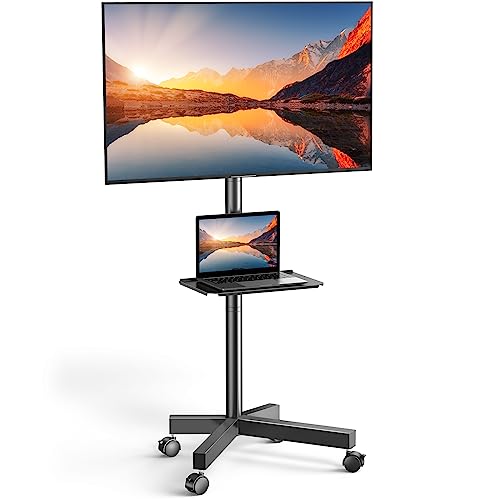
- UNIVERSAL TV CART ON WHEELS: our mobile TV cart fits most 23" to 65" LCD, LED, flat screen and curved TVs weighing up to 99 lbs. This rolling TV cart fits VESA 100x100, 200x100
- HEIGHT ADJUSTABLE TRAY: comes with a sturdy media shelf to hold your laptop, DVD player or gaming devices. Distance from the floor to the AV shelf is from 12" to 24". The wall
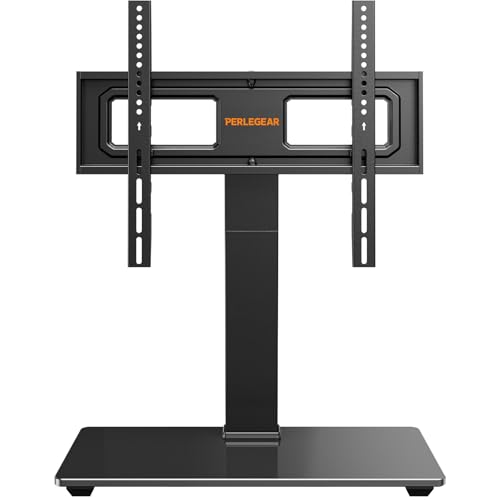
- 【Universal TV stand Holds Most TVs】 The table top TV stand fits 32",40",42",43",50",55",60",65",70" flat-panel LCD/LED TVs, with VESA pattern sizes from 100x100mm, 100x200mm
- 【SWIVELS 60° - Maximize Your Viewing Experience】This universal swivel TV stand allows you to swivel your screen 30° left or right to direct the screen anywhere in the room. The TV
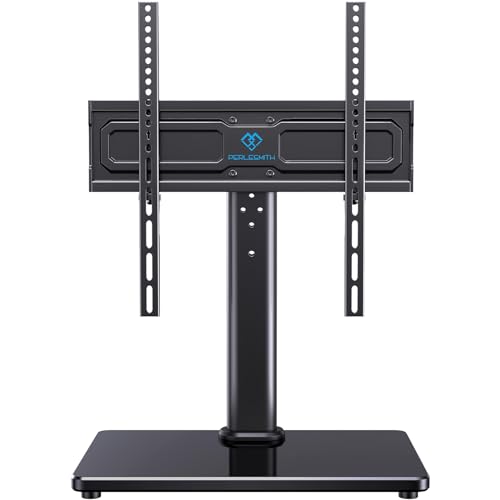
- Wide Compatibility: Our universal TV stand is designed to accommodate TVs of all types and sizes. Supporting screens from 24 to 60 inches and VESA patterns from 100x100mm to
- 50° Extra Swivel Flexibility: Enjoy wider flexibility with a swivel range of 50° left or right to direct the screen toward your viewing position. The swivel TV stand allows you to
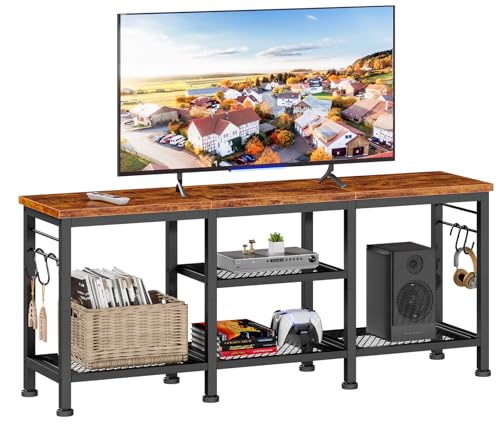
- Ample Storage Space: This tv console has 2 tiers open mesh shelves and 4 hooks, provides ample space to organize and display your media equipment, gaming consoles, DVDs, Xbox, PS4
- Open Space Design Media Stand: Open space means no overheating electronics and provides ease of access for cables. You don't have to worry about the device overheating due to
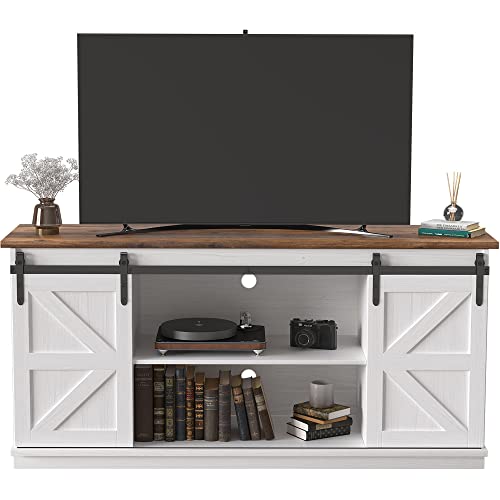
- Farmhouse Style TV stand: This media console cabinet can be used as a TV stand to support flat screen TVs up to 65", suitable for most home TV placement. If you like, it can also
- Sliding Barn Doors: Two movable barn doors on the TV stand for convenient access to cabinets. Quality steel bar make doors slide smoothly, and no noise during movement. Two
What a wall mount actually is
A wall mount is a metal bracket that bolts to your TV's VESA holes on one side and into wall studs on the other. Three flavors: fixed (sits flat, roughly 1–2 inches off the wall, no adjustment), tilting (angles down, for TVs above eye level), and full-motion / articulating (swings out and pivots, for corner setups or rooms with two seating areas).
The catch nobody mentions in the product photos: a mount holds the TV and nothing else. Your console, receiver, router, and soundbar still need somewhere to live, and your cables still need to get from the TV to them — either through the wall via an in-wall cable kit, or down the wall in a raceway. Budget for that second purchase.
Finding the right how to choose tv stand vs wall mount comes down to matching the features to how you will actually use it.
The decision in four questions
Do you own the wall? Renters mounting into drywall are signing up for anchor holes and a security deposit conversation. Some leases forbid it outright.
Where's the outlet? Mounting a TV over an outlet is fine. Mounting it eight feet up over a fireplace with no outlet means an electrician or a very visible cord.
What's your seating height? The middle of the screen should land near seated eye level, usually 40–45 inches from the floor. Mounts above a fireplace mantel routinely blow past that, which is why tilting brackets exist — and why height-adjustable stand bases exist too.
Do you have gear? Consoles, a cable box, a soundbar, and a games library all want a surface. If you mount, you'll likely still buy a media console, so you're paying twice.
One honest note on this list: these are the stand-side and VESA-bracket-on-a-base options. If you've already decided on a true in-wall bracket, none of these six is that product — but the three VESA-based options below give you the mount's eye-level positioning without the drilling, which is the actual middle ground most people are looking for.
PERLESMITH Rolling TV Stand on Wheels for 23-65 Inch TVs,Tilt Mobile TV Cart Holds up to 99 lbs with Adjustable Height Shelf, Outdoor TV Stand for Bedroom Max VESA 400x400mm PSTVMC04 — when the TV needs to move
This is the answer to "I want the mounted look but the TV has to go outside for the game." It's a VESA mount on a wheeled column, rated for 23–65" screens up to 99 lbs, covering VESA patterns from 100x100 up to 400x400mm. It tilts down 5° and up 10°, and the four casters lock so it stays put once positioned. There's a height-adjustable AV shelf sitting 12" to 24" off the floor for a console or player, cable routing hidden inside the metal column, and a 20.8" x 15.7" base. If you rent, or your "living room" changes shape depending on the season, this solves the problem a fixed bracket creates.
PERLESMITH Rolling TV Stand on Wheels
Perlegear Universal Swivel TV Stand Base for 32–70 inch TVs, Height Adjustable Table Top TV Stand Mount with Tilt, Tempered Glass Base, Holds up to 88 lbs — the widest screen range without drilling
Fits 32" through 70" panels up to 88 lbs, VESA 100x100 to 400x400mm. The reason to pick it over a wall bracket is the 60° swivel — 30° left or right — which does the job a full-motion mount does, at a fraction of the price and with zero holes. It tilts up 8°, which also counteracts the forward lean big panels sometimes develop. Nine height settings come from three column positions crossed with three bracket positions, with a stated screen-center height up to 24" above the 15.75" x 10.24" tempered glass base, leaving clearance underneath for a soundbar or cable box. The listing quotes a 10-minute assembly.
Perlegear Universal Swivel TV Stand Base
PERLESMITH Universal Swivel TV Stand for 24-60 inch TVs up to 99 lbs, 12 Height Adjustable Table Top TV Stand, TV Base Stand with Tempered Glass Base, Max VESA 400x400mm, PSTVS33 — the finest height control
Similar concept, different emphasis: 24–60" screens, 99 lbs capacity, VESA 100x100 to 400x400mm, and 12 height configurations from four pillar heights times two bracket heights, with the plate reaching up to 15.63" tall. Swivel is 50° in each direction. The base is 14.17" x 9.06" with 8mm tempered glass, and two cable clips attach to the pillar to keep the run tidy. If your neck angle is the thing you're trying to fix — the main reason people mount in the first place — this gives you the most granular adjustment of the three.
PERLESMITH Universal Swivel TV Stand PSTVS33
Furologee TV Stand for TVs up to 55 Inch, Entertainment Center with Open Storage Shelves, Media Console Table with Soundbar Shelf for Living Room, Bedroom, Rustic Brown — the cheap companion piece if you do mount
At 55 inches long and $45.98, this is the piece to pair with a wall mount as much as to use alone. Two tiers of open mesh shelving plus four hooks handle a console, a player, and controllers, and the open-back design means no heat trapped around a receiver and no fishing for cables behind a closed panel. Particleboard top on a metal frame, three-tier open structure. It supports TVs up to 55" on top if you skip the bracket entirely.
Furologee TV Stand for TVs up to 55 Inch
JUMMICO TV Stand for 65 Inch TV, Sliding Barn Doors, Bright White — hiding the clutter behind doors
The opposite philosophy to open shelving: two sliding barn doors on steel bars conceal two storage cabinets, with two open side spaces and three levels of adjustable, removable shelves. Supports flat screens up to 65" on top. Manufactured wood frame with a laminate top. Worth knowing before you buy: closed cabinets restrict airflow, so put the receiver in an open bay and the DVDs behind the doors. The listing recommends two people for assembly.
JUMMICO TV Stand for 65 Inch TV
Casaottima TV Stand for 65 Inch TV, Entertainment Center, White — solving the outlet problem a mount creates
59"L x 25.6"H x 13.8"D, rated for a 65" TV, with a built-in power outlet and cable management — which is the specific headache mounting introduces and this sidesteps. Two storage cabinets, four open compartments, an adjustable center shelf, LED strips in multiple colors, and a 1-inch thickened tabletop. It's the priciest here at $129.99, and the LED lighting is either the selling point or the dealbreaker depending on your taste.
Casaottima TV Stand for 65 Inch TV
The honest trade-offs
Mounting costs more than the bracket. Add an in-wall cable kit or raceway, possibly an outlet relocation, and a console for your gear anyway. A $40 bracket can become a $250 project.
Mounting is only as strong as your studs. Drywall anchors alone are not adequate for a large panel. If you can't find studs where you want the TV, you need a mounting plate spanning two studs, or a different plan.
Stands wobble; walls don't. A tabletop base concentrates a 60-inch screen's mass on a small footprint — the Perlegear base is 15.75" x 10.24", the PERLESMITH PSTVS33 is 14.17" x 9.06". Both are tempered glass and steel, but on carpet, or with a toddler in the house, anti-tip straps are still smart.
Weight limits are load-bearing claims, not marketing. Check your TV's actual weight and VESA pattern before ordering. The rolling PERLESMITH cart and the PSTVS33 both state 99 lbs; the Perlegear base states 88 lbs. The three wooden consoles here don't publish a weight rating at all, so treat their stated screen sizes as the guide.
Mounted TVs are harder to service. Swapping an HDMI cable behind a wall-mounted screen means unhooking it or working blind.
Before you commit either way, read through current buyer reviews and Q&A on the specific model — particularly for hardware quality and whether the VESA spacing matched people's TVs — since that's where mismatches surface first.
FAQ
Is it better to wall mount a TV or put it on a stand? Neither is universally better. Mount if you own the place, want the floor clear, and the screen is the room's centerpiece. Use a stand if you rent, move, need storage, or want to change the layout later. A swivel tabletop base like the Perlegear or the PSTVS33 splits the difference — mount-style height and angle control, no holes.
What height should the TV be? Aim for the center of the screen near seated eye level, roughly 40–45 inches from the floor for a standard sofa. That's why height adjustment matters: the PSTVS33 offers 12 configurations and the Perlegear offers 9. Above a fireplace you'll almost always need a tilting bracket to compensate.
Can I mount a TV without drilling? Not into a wall, no — any real bracket needs stud fasteners. But you can get the mounted look with a VESA base on a console, or the mounted positioning with a mobile cart like the PERLESMITH rolling stand, which uses the same VESA plate concept on a wheeled column.
Do I still need a TV stand if I wall mount? Usually yes. Consoles, players, routers and soundbars need a home. An open-shelf piece like the Furologee console is the low-cost way to cover that, since open shelving keeps electronics cool and cables reachable.
Related guides
- Best TV stands and media furniture - TV stands, entertainment centers, media consoles, TV wall mounts, floating media shelves, gaming desks, audio racks, cable management After Recent Issues
- Best TV stands and media furniture - TV stands, entertainment centers, media consoles, TV wall mounts, floating media shelves, gaming desks, audio racks, cable management for Small Business Owners
- How to Succeed with Best TV stands and media furniture - TV stands, entertainment centers, media consoles, TV wall mounts, floating media shelves, gaming desks, audio racks, cable management
Key Takeaways
- Choosing the right how to choose tv stand vs wall mount means matching the key features to your specific needs and budget
- Read real customer reviews and check the return policy before you commit
- Compare value across models — the priciest option is not always the best fit