As an Amazon Associate this site earns from qualifying purchases.
Spec and compatibility table
| Product | TV size range | Max weight | VESA range | Motion | Wall/stud notes | Price |
|---|---|---|---|---|---|---|
| Perlegear No Drill TV Wall Mount for 24–65 inch TVs up to 100 lbs | 24"–65" | 100 lbs | 100x100–400x400mm | Fixed, sits 1.12" from wall | Nails into drywall; concrete, brick, block recommended; not for cavity walls; hardware for 8"/12"/16" wood studs | Check price on Amazon |
| Pipishell Full Motion TV Wall Mount for Echo Show 21/15 and 13-43 Inch Flat Curved Screen TVs & Monitors, Max VESA 200x200mm up to 44lbs, TV Mount Wall Bracket with Rotation Swivel Tilt Extension | 13"–43" | 44 lbs | 75x75–200x200mm | Tilt +9°/-11°, swivel up to 90°, 360° rotation, extends 14.59", retracts 2.7" | Single wood stud, concrete or brick | Check price on Amazon |
| Mounting Dream TV Wall Mount for Most 37-90 Inch TVs, Universal Tilt TV Mount Fit 16", 18", 24" Stud with Loading Capacity 132lbs, Max Vesa 600 x 400mm, Low Profile Flat Wall Mount TV Bracket | 37"–90" | 132 lbs | Up to 600x400mm | Tilt up to 8° forward, 1.5" from wall | 16"/18"/24" wood studs; NOT for drywall only; concrete anchors 10x50mm may be needed | Check price on Amazon |
| Mounting Dream TV Wall Mount for 32-70 Inch Television,Mount with Swivel and Tilt, Full Motion Bracket with Articulating Dual Arms, Fits 16inch Studs, Max VESA 400X400 mm, 99lbs, MD2380 | 32"–70" | 99 lbs | Up to 400x400mm | Tilt up 5°/down 15°, swivel, extends 17.5", retracts 3.4" | Standard 16" studs; NOT for drywall installation | Check price on Amazon |
| HangSmart TV Wall Mount NO Stud - Original & Patented Easy Install, DIY for 19-100" TVs, Holds Up to 150LBS, Fits Most LED LCD Flat Screens & Monitors, Includes Hardware | 19"–100" | 150 lbs | Not stated | Not stated | No stud required; drywall, brick, cement, wood, concrete | Check price on Amazon |
| Suptek TV Wall Bracket Mount Swivel and Tilt for Most 15"-32" LED, LCD, OLED Flat Screen TVs and Monitors with VESA 75x75-100x100mm up to 13kg Full Motion Monitor Wall Bracket MA2720 | 15"–32" | 13 kg | 75x75–100x100mm | 360° rotation, 180° swivel, ±20° tilt, 63mm to 380mm from wall | Not stated | Check price on Amazon |
Quick answer: Mounting a TV on the wall comes down to three checks before you touch a drill — your TV's VESA hole pattern, its weight, and what's actually behind the drywall. Get those right, pick a mount rated above your TV's weight, and anchor into studs (or a masonry wall) rather than drywall alone. The physical install takes about 45 minutes; the measuring and checking is what people rush and regret.
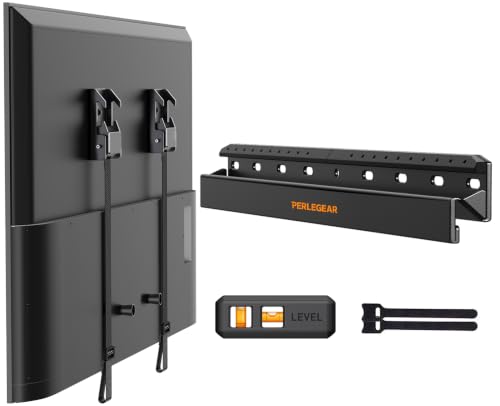
- No Drill TV Wall Mount: Tired of the hassle of drilling big holes or finding studs in your wall? This Perlegear renter friendly TV mount does not require any drilling or
- Wide Compatibility: Ensure compatibility with the no drill TV wall mount, the followed three conditions must be met at the same time: first, the TV size ranges 24″ to 65″
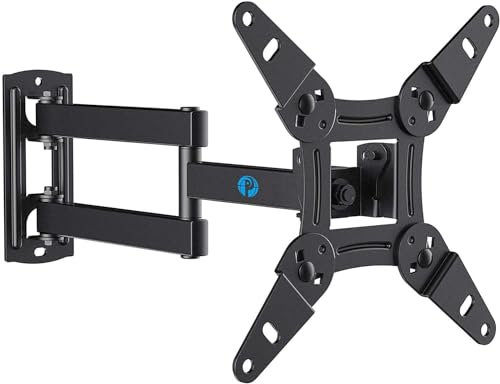
- Full Motion for Optimal Viewing - Our articulating arm small tv mount tilts +9°/-11° for anti-glaring, max swivels 90° display left or right according to your seats position
- Universal Monitor Wall Mount - ideal for large computer monitors, especially monitors sizes 13, 17, 19, 21, 24, 27, 32, 34, 35 inch ultrawide monitors with VESA patterns from
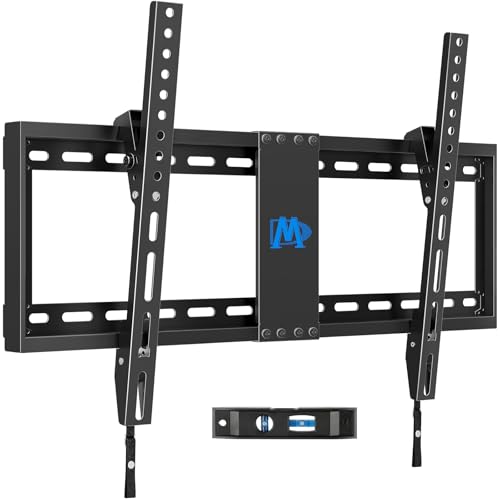
- [TV Wall Mount and Suitability] This tilting TV mount is suitable for 37-90 inch TVs, holding a weight of 132lbs with Max VESA 600x400mm, supporting up to 24 inches wood stud
- [Space Saving] Low profile design allows TV to be closer to the wall than the standard TV bracket, with a distance of only 1.5 inches, this wall mount provides an ideal
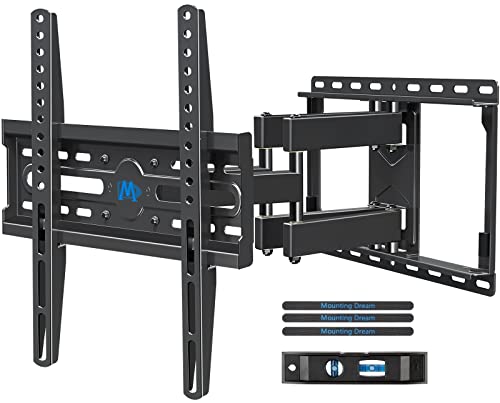
- Enhance Viewing Experience: This full motion TV wall mount tilts TV up 5° and down 15° to reduce glare, and swivels TV left or right according to your seat position. Pull out to
- Easy Installation: TV mount comes with clear instructions and hardware in pre-labeled bags. +/-3° post-installation adjustment allows TV leveling after installation. The paper
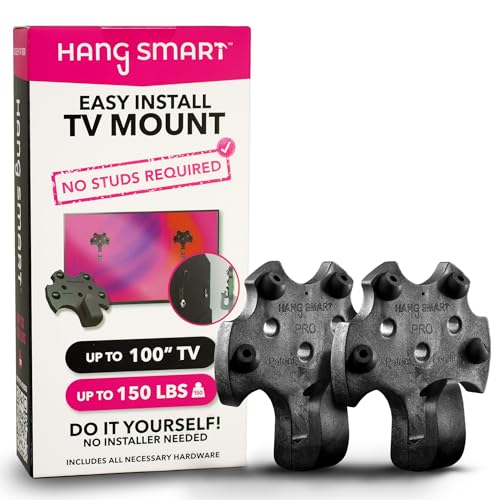
- FULLY DIY NO-STUD PATENTED SOLUTION: HangSmart TV offers a complete DIY no-stud mount experience, making it a perfect choice for homeowners and renters who prefer a no-fuss
- VERSATILE TV COMPATIBILITY: Designed to accommodate almost any flat screen LED or curved TV, HangSmart TV mount caters to a wide range of popular brands and models, ensuring broad
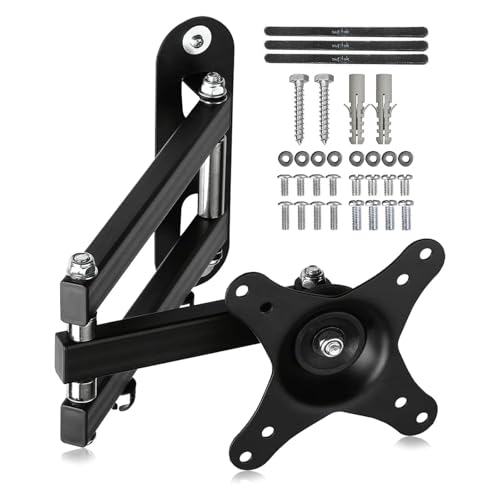
- PERFECT TV WALL BRACKET – This Suptek tv wall bracket is a great all-round TV wall mount that offers full-motion tilt and swivel making it suitable for a wide variety of room
- SMART AND STRENGTH – Suptek Technology have designed this monitor wall mount for strength and stability. All Suptek Mount manufactured with cold-rolled steel, giving you the
Before you buy anything: three numbers
You need these written down before a mount goes in your cart. Nearly every "this doesn't fit" return traces back to skipping one.
1. VESA pattern. Flip the TV face-down on a blanket and measure the distance between the four threaded holes on the back — horizontally and vertically, in millimetres. That's your VESA, e.g. 400x400. Mounts state a range. A 43" TV with 200x200 holes will not attach to a mount that starts at 400x400.
Finding the right how to mount a tv on the wall comes down to matching the features to how you will actually use it.
2. TV weight. It's on the box, in the manual, or on the manufacturer's spec page. Use the weight without the stand. Then buy a mount rated well above it — not just barely above.
3. What's in the wall. This is the one that decides everything else. Wood studs behind drywall? Solid brick, block or concrete? Or a hollow cavity wall with nothing structural to bite into? A stud finder tells you the first; knocking tells you a lot too — solid walls thud, cavity walls sound hollow.
Step by step
Step 1 — Find and mark the studs. Run a stud finder horizontally and mark both edges of each stud, then mark the centre between them. Gotcha: stud finders lie near pipes, wiring and metal corner bead. Confirm with a small finish nail or a strong magnet hunting for drywall screws before you commit to a bracket hole.
Step 2 — Check your stud spacing against the mount. Most mounts assume 16" centres. Some houses use 24". If your studs are 24" apart and the mount only spans 16", you're stuck. The Mounting Dream TV Wall Mount for Most 37-90 Inch TVs, Universal Tilt TV Mount Fit 16", 18", 24" Stud with Loading Capacity 132lbs, Max Vesa 600 x 400mm, Low Profile Flat Wall Mount TV Bracket states support for 24" wood stud spacing, which is the fix for that specific problem.
Step 3 — Set the height. Sit where you'll actually watch from. The centre of the screen should land roughly at your seated eye level. Gotcha: people mount too high, almost universally — above a fireplace is the classic offender, and it means craning your neck all evening. If the mount has to go high, buy one that tilts.
Step 4 — Mark and drill the wall plate. Use the paper template if one's included, and a level. Drill pilot holes at stud centres. Gotcha: level the plate, not the template — templates shift when you tape them. Most mounts also have a few degrees of post-install adjustment, so a slight error is recoverable.
Step 5 — Bolt the brackets to the TV. Match the screw diameter to your VESA size (M4/M6/M8) and don't overtighten — you're threading into a plastic or thin metal insert. If the screws bottom out before the bracket is snug, you need the supplied spacers.
Step 6 — Route cables before you hang. Power, HDMI, ARC to the soundbar. Plug everything in and leave slack. Gotcha: once a 65" TV is on a low-profile mount 1.5" from the wall, you cannot reach the ports. Test every input while you can still get behind it.
Step 7 — Hang it and lock it. Two people. One lifts, one guides the brackets onto the plate. Then engage the safety locks — many mounts use pull cords for this. Gotcha: if you skip the lock, the TV is just resting there.
Step 8 — Level, tilt, tidy. Adjust, then clip cables into a raceway or channel so nothing dangles.
What goes wrong
Mounted into drywall alone. Symptom: the plate feels solid on day one, then the top edge pulls away over weeks and the TV tilts forward. Fix: stop using it immediately, patch, and re-mount into studs or masonry. Several mounts state outright they are not for drywall-only installation — take that literally.
Bracket won't reach the TV's holes. Symptom: two screws line up, two don't. Fix: you measured VESA wrong or bought outside the range. Re-measure hole-centre to hole-centre; return the mount.
TV sags on one side. Symptom: visible tilt after hanging. Fix: usually one bracket sits a notch higher on the TV, or the plate isn't level. Use the mount's post-install adjustment; if there isn't enough, re-drill.
Glare washes out the picture. Symptom: daytime viewing is unwatchable. Fix: a tilting or full-motion mount angles the screen down and away from windows. A fixed mount can't fix this after the fact.
Cables too short. Symptom: the TV won't seat because the HDMI is stretched. Fix: measure the run before mounting and buy longer cables — a full-motion arm that extends 14–17" needs noticeably more slack than a flat mount.
Renting and worried about the wall. Symptom: a hole you'll pay for at move-out. Fix: a no-stud or no-drill mount that spreads load differently — but check the wall types the maker actually lists.
When the fix is a new one
Perlegear No Drill TV Wall Mount for 24–65 inch TVs up to 100 lbs — removes the drilling step
If the blocker is "I don't want to drill," this one goes up with a hammer and nails into drywall. Three conditions must all be true: 24–65", under 100 lbs, VESA 100x100–400x400. It sits 1.12" from the wall and uses pull-cord locks. Note the maker says it's not suitable for cavity walls. Read the Perlegear No Drill TV Wall Mount for 24–65 inch TVs up to 100 lbs listing and current reviews yourself before assuming your wall qualifies.
HangSmart TV Wall Mount NO Stud — handles walls with no usable stud
Rated to 150 lbs and TVs up to 100", and listed for drywall, brick, cement, wood and concrete without needing a stud. That combination is unusual, so if your stud finder came back empty where you need the TV, the HangSmart TV Wall Mount NO Stud - Original & Patented Easy Install, DIY for 19-100" TVs, Holds Up to 150LBS, Fits Most LED LCD Flat Screens & Monitors, Includes Hardware is the category to look at.
Mounting Dream TV Wall Mount for Most 37-90 Inch TVs — solves 24" stud spacing on big screens
Big TV, wide studs, want it tight to the wall: 37–90", 132 lbs, VESA to 600x400mm, 1.5" from the wall, 8° tilt. Full details are on the Mounting Dream TV Wall Mount for Most 37-90 Inch TVs, Universal Tilt TV Mount Fit 16", 18", 24" Stud with Loading Capacity 132lbs, Max Vesa 600 x 400mm, Low Profile Flat Wall Mount TV Bracket page — including that it isn't for drywall-only walls.
Mounting Dream MD2380 — pulls the TV off the wall to reach ports and beat glare
Extends to 17.5" and retracts to 3.4", tilts up 5° and down 15°, swivels, and offers ±3° post-install levelling. For 32–70" TVs to 99 lbs on 16" studs. See the Mounting Dream TV Wall Mount for 32-70 Inch Television,Mount with Swivel and Tilt, Full Motion Bracket with Articulating Dual Arms, Fits 16inch Studs, Max VESA 400X400 mm, 99lbs, MD2380 spec sheet for stud-spacing caveats.
Pipishell Full Motion TV Wall Mount — single-stud install for smaller screens
For 13–43" screens up to 44 lbs, VESA 75x75–200x200mm, installable on a single wood stud, concrete or brick. Extends 14.59" and retracts to 2.7". The Pipishell Full Motion TV Wall Mount for Echo Show 21/15 and 13-43 Inch Flat Curved Screen TVs & Monitors, Max VESA 200x200mm up to 44lbs, TV Mount Wall Bracket with Rotation Swivel Tilt Extension listing notes max swivel varies with screen size.
Suptek MA2720 — bedroom, kitchen and monitor-sized screens
15–32", up to 13 kg, VESA 75x75–100x100mm, with 360° rotation, 180° swivel and ±20° tilt, sitting 63mm from the wall and extending to 380mm. Cable concealment panels are built in. Check the Suptek TV Wall Bracket Mount Swivel and Tilt for Most 15"-32" LED, LCD, OLED Flat Screen TVs and Monitors with VESA 75x75-100x100mm up to 13kg Full Motion Monitor Wall Bracket MA2720 page for wall-type guidance.
FAQ
Can you mount a TV on any wall? No. Wood-stud and solid masonry walls are fine with the right hardware. Drywall with nothing behind it, hollow cavity walls, and plaster-and-lath are the problem cases — several mounts explicitly exclude them. Identify the wall first, then buy.
Do I need to hit a stud? For most mounts, yes — that's what carries the load. Exceptions exist: no-stud designs spread load across a wider area, and masonry walls use anchors instead. Never rely on plastic drywall anchors for a TV.
How high should the TV go? Screen centre at seated eye level. If the layout forces it higher, use a tilting mount so the screen angles down toward you.
Can one person do this? The wall plate, yes. Lifting the TV onto it, get help — a 65" panel is awkward more than heavy, and dropping it at the last inch is the most expensive mistake in this whole job.
Related guides
- About Our Best TV stands and media furniture - TV stands, entertainment centers, media consoles, TV wall mounts, floating media shelves, gaming desks, audio racks, cable management Process
- Why Rates Vary for Best TV stands and media furniture - TV stands, entertainment centers, media consoles, TV wall mounts, floating media shelves, gaming desks, audio racks, cable management
- Privacy Policy
Key Takeaways
- Choosing the right how to mount a tv on the wall means matching the key features to your specific needs and budget
- Read real customer reviews and check the return policy before you commit
- Compare value across models — the priciest option is not always the best fit