As an Amazon Associate this site earns from qualifying purchases.
Specifications at a glance
| Product | Max TV size | Dimensions | Storage | Power / LED | Price |
|---|---|---|---|---|---|
| JUMMICO TV Stand for 65 Inch TV, Sliding Barn Doors, Bright White | 65" | Not stated | 2 cabinets, 2 open spaces, 3 levels of adjustable/removable shelves | None stated | Check price on Amazon |
| Casaottima TV Stand for 65 Inch TV, Entertainment Center, White | 65" | 59"L x 25.6"H x 13.8"D | 2 cabinets, 4 open compartments, adjustable center shelf | Built-in outlet, cable management, LED strips | Check price on Amazon |
| YITAHOME 59" TV Stand with Power Outlet & LED Light for 65 Inch TVs, Black | 65" | 59"L x 15.7"W x 25.6"H | 2 cabinets, 4 open spaces, movable shelves | Built-in outlet, cable management, LED strips | Check price on Amazon |
| OneBlis 70" Mid Century Modern TV Stand (Walnut) | Not stated | 70" wide | Sliding-door side storage, adjustable shelves | 2 outlets, 1 USB-A, 1 USB-C, cable holes | Check price on Amazon |
| Furologee TV Stand for TVs up to 55 Inch, Rustic Brown | 55" | 55" long | 2 tiers of open mesh shelves, 4 hooks, soundbar shelf | None stated | Check price on Amazon |
| Bestier Black 60 Inch Modern TV Stand, LED Entertainment Center with Drawer | 65" | 60" wide | 1 drawer, 2 open compartments | LED strip, 7 colors, 22 modes, remote | Check price on Amazon |
Quick answer: For most living rooms with a 55–65 inch TV, a 59–60 inch console with a mix of closed cabinets and open shelving is the sweet spot — wide enough that the TV base doesn't overhang, deep enough for a receiver, and closed enough to hide the clutter. The JUMMICO TV Stand for 65 Inch TV, Sliding Barn Doors, Bright White is a reasonable default at $114.99 because it covers the basics — 65-inch TV support, two cabinets, adjustable shelves — without adding LED strips or outlets you may not want. If you need built-in power, USB charging, or a stand for a small room, the alternatives further down cover those cases.
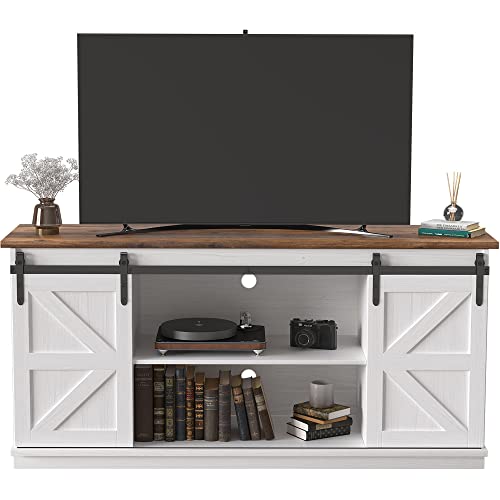
- Farmhouse Style TV stand: This media console cabinet can be used as a TV stand to support flat screen TVs up to 65", suitable for most home TV placement. If you like, it can also
- Sliding Barn Doors: Two movable barn doors on the TV stand for convenient access to cabinets. Quality steel bar make doors slide smoothly, and no noise during movement. Two
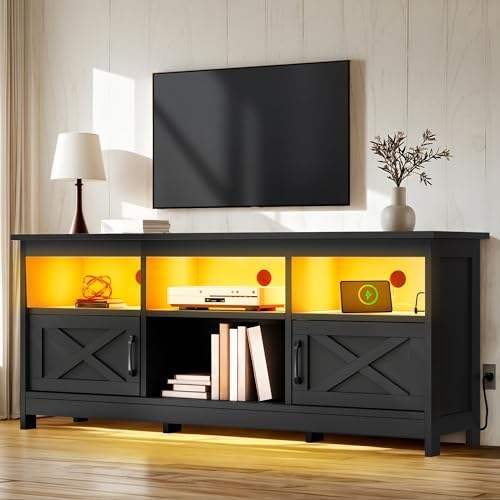
- Farmhouse TV Cabinet: The YITAHOME TV cabinet measures 59 inches long x 15.7 inches wide x 25.6 inches high and supports up to a 65-inch TV; featuring a clean color palette and
- Flexible Storage Solutions: This TV stand features a customizable storage layout with movable shelves to accommodate items of varying heights; 4 open spaces and 2 storage cabinets
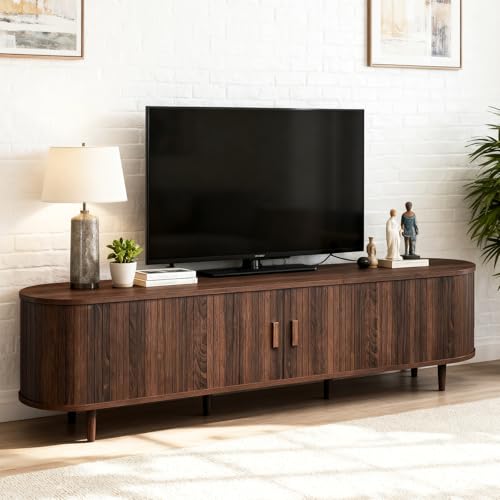
- Unique Sliding Door: The walnut-colored sliding door design gives the TV stand a distinctive and appealing look. Sliding doors and wood handles combine to incorporate natural
- Ample Storage Space: The wood TV stands includes multiple spaces to make the most of everything. The spacious countertop can be used to display items such as TVs or picture
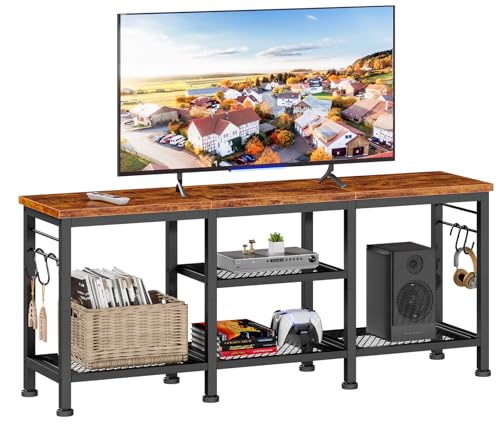
- Ample Storage Space: This tv console has 2 tiers open mesh shelves and 4 hooks, provides ample space to organize and display your media equipment, gaming consoles, DVDs, Xbox, PS4
- Open Space Design Media Stand: Open space means no overheating electronics and provides ease of access for cables. You don't have to worry about the device overheating due to
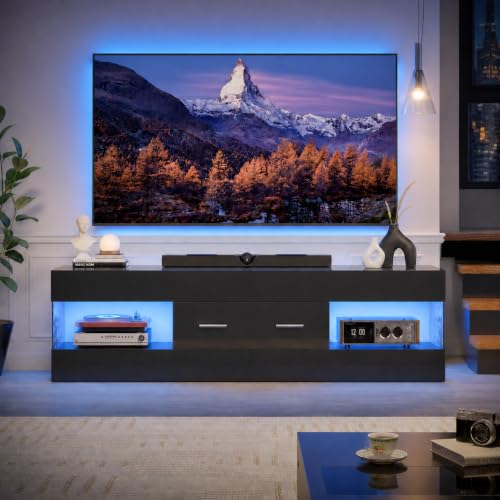
- Modern TV stands for Living Room: Featuring a high-gloss finish combined with striking stone-patterned side panels, this TV cabinet adds a touch of modern sophistication to any
- Ample Storage Space: Equipped with one drawer and two open compartments, this media cabinet offers plenty of storage options. Perfect for organizing your media accessories. You
Sizing: the part people get wrong
Two numbers matter more than anything else on the listing.
Width. A 65-inch TV is roughly 57 inches wide. A 59- or 60-inch console leaves you about an inch of margin on each side, which looks tight but works — as long as your TV's feet sit inboard. Many 65-inch TVs use splayed feet near the outer edges, and those can span 48–55 inches. Measure foot-to-foot, not screen corner to screen corner, before you commit.
Finding the right entertainment center buyers guide comes down to matching the features to how you will actually use it.
Depth. This is where people get burned. The YITAHOME 59" TV Stand is 15.7 inches deep; the Casaottima is 13.8 inches deep. An AV receiver is typically 13–17 inches deep before you add cable clearance behind it. If you run separates, check that number against your gear first — a two-inch difference decides whether the cabinet door closes.
Height. Both the Casaottima and YITAHOME stands are 25.6 inches tall. Add the TV's stand height and the screen center lands high for a low sofa. Sitting eye level is usually 40–44 inches; consoles in the 24–26 inch range put a 65-inch screen center around 40–44 inches, which is about right. Taller consoles push you into looking up, which gets tiring during a long movie.
Who a mid-priced closed-cabinet console is for
You want this style — the JUMMICO, Casaottima, YITAHOME, or Bestier tier — if:
- You have a 55–65 inch TV and a living room wall to fill.
- You own things you'd rather not look at: game consoles, remotes, cables, spare controllers, board games.
- You want one piece of furniture to solve storage and TV support at once, and you're spending in the $115–155 range rather than $400+.
- You're comfortable with flat-pack assembly. Every one of these ships as a kit with numbered parts.
Who should skip this whole category
Be honest with yourself if any of these apply:
- You're wall-mounting the TV. If the screen goes on the wall, you don't need a 25-inch-tall console with a load-rated top. You need a low, shallow media shelf, and you'll be happier with one.
- You want real wood. These are manufactured wood, particleboard, and MDF. The Bestier stand explicitly uses particleboard and MDF; the JUMMICO uses a manufactured wood frame with decorative laminate. That's normal at this price and it's fine, but it will not age like solid oak, and repeated moves will loosen cam-lock joints.
- Your gear runs hot in a closed box. A stack of a receiver plus a console inside a sealed cabinet with a magnetic latch is a ventilation problem. Open-shelf designs exist for a reason.
- You hate assembly. JUMMICO's own guidance is that two people should assemble their stand. Take that seriously with a 59-inch panel.
The honest trade-offs
LED strips are a preference, not a feature upgrade. The Casaottima, YITAHOME, and Bestier stands all include color-changing LEDs; the Bestier adds a remote with 7 colors and 22 modes. Some people love the bias-light look. Some people turn it on once and never again. Don't pay a premium for it if you're in the second group.
Built-in outlets are genuinely useful — and a long-term commitment. The OneBlis stand includes two standard outlets plus USB-A and USB-C; the Casaottima and YITAHOME each include a built-in outlet with cable management. This is the single feature most worth having, because it turns one wall plug into a tidy hub. The catch: integrated electrical hardware is the part most likely to fail years later, and it's not user-replaceable.
Open storage is cooler and messier. The Furologee stand is entirely open mesh shelving, which its listing frames as a deliberate anti-overheating choice. It's true. It also means everything you own is on display.
Closed cabinets hide clutter and block IR. Barn doors and cabinet fronts look clean, but a remote may not reach a device behind a solid panel. Plan for an IR repeater or keep the device you actually control on an open shelf.
What to check on the listing before you buy
Listings change, and the version you see may not match what's described here. Before you order:
- Confirm the current price and whether a coupon applies. Prices in this category move constantly.
- Confirm the variant. Several of these come in multiple colors and widths — the Casaottima and OneBlis listings both mention multiple color options. Selecting a different swatch can change the price, the dimensions, and the ship date.
- Confirm the exact dimensions on the variant you selected, not the ones in the headline.
- Check the warranty and return window in the manufacturer section, and check what happens if a panel arrives damaged — that's the most common flat-pack problem.
- Read recent buyer reviews and question threads yourself, filtering to the most recent ones. Older reviews may describe a different production run.
- Check weight capacity if you're placing a heavy TV. The Bestier listing states 200 pounds; the others don't state a figure.
Alternatives worth considering
Casaottima TV Stand for 65 Inch TV, Entertainment Center, White — consider instead if…
…you want the built-in outlet and cable management without hunting for a power strip. The Casaottima TV Stand for 65 Inch TV, Entertainment Center, White is 59"L x 25.6"H x 13.8"D, holds up to a 65-inch TV, and pairs two cabinets with four open compartments and an adjustable center shelf. At $129.99 it's $15 over the JUMMICO for the outlet, the LED strips, and a stated 1-inch thickened top. The 13.8-inch depth is the constraint — measure your receiver.
YITAHOME 59" TV Stand with Power Outlet & LED Light for 65 Inch TVs, Black — consider instead if…
…you want the same feature set in black and need the extra two inches of depth. The YITAHOME 59" TV Stand with Power Outlet & LED Light for 65 Inch TVs, Black measures 59" x 15.7" x 25.6", supports up to a 65-inch TV, and includes an anti-tip mechanism, a built-in outlet, cable management, movable shelves across 4 open spaces and 2 cabinets, and a magnetic door latch. $124.99. The anti-tip hardware matters if you have kids or pets.
OneBlis 70" Mid Century Modern TV Stand, Wood TV Consoles with Sliding Doors and Power Outlet, Entertainment Center with Adjustable Shelves, Fluted TV Stands for Living Room, Walnut — consider instead if…
…your TV is 65 inches or larger and a 59-inch console would look undersized. The OneBlis 70" Mid Century Modern TV Stand, Wood TV Consoles with Sliding Doors and Power Outlet, Entertainment Center with Adjustable Shelves, Fluted TV Stands for Living Room, Walnut is 70 inches wide with fluted sliding doors, adjustable shelves, hidden side storage, cable holes, and the most complete power setup here: two standard outlets, a USB-A port, and a USB-C port. $152.99. Note that the listing doesn't state a maximum TV size — go by the 70-inch width and your TV's foot span.
Furologee TV Stand for TVs up to 55 Inch, Entertainment Center with Open Storage Shelves, Media Console Table with Soundbar Shelf for Living Room, Bedroom, Rustic Brown — consider instead if…
…you have a 55-inch or smaller TV, a soundbar, and a tight budget. The Furologee TV Stand for TVs up to 55 Inch, Entertainment Center with Open Storage Shelves, Media Console Table with Soundbar Shelf for Living Room, Bedroom, Rustic Brown is 55 inches long with a metal frame, a particleboard top, two tiers of open mesh shelving, a dedicated soundbar shelf, and four hooks. At $45.98 it's a third the price of the closed cabinets — because there are no cabinets. Everything stays visible, and everything stays ventilated.
Bestier Black 60 Inch Modern TV Stand, LED Entertainment Center with Drawer — consider instead if…
…you want a drawer rather than cabinet doors, and you want the lighting to be adjustable. The Bestier Black 60 Inch Modern TV Stand, LED Entertainment Center with Drawer is 60 inches wide for TVs up to 65 inches, with a high-gloss finish and stone-patterned side panels, one drawer on bottom-mounted slides, two open compartments, a stated 200-pound capacity, two anti-tipping devices, and a remote-controlled LED strip with 7 colors and 22 modes. $121.99. High-gloss black shows dust and fingerprints — factor that in.
FAQ
How wide should the stand be for a 65-inch TV? At minimum, wider than your TV's foot span; ideally as wide as or wider than the screen. A 59–60 inch console works with most 65-inch TVs, but a 70-inch console like the OneBlis gives you visual breathing room and space for a lamp or speaker on top.
Do I need a stand with a built-in power outlet? No, but it's the feature that most reduces visible cable mess. If your TV wall has a single outlet behind the console, an integrated outlet plus cable management means one cord runs to the wall instead of five. If you already own a good power strip, you can skip it and save the money.
Will my AV receiver fit inside these cabinets? Check the depth number, not the width. Many receivers need 15–18 inches including rear cable clearance, so a 13.8-inch-deep cabinet is likely too shallow with the door closed. Open-shelf designs sidestep this entirely.
Is particleboard and MDF construction a dealbreaker? Not at this price point — it's what nearly everything under $200 uses. It holds a TV fine when assembled correctly and anchored. It's less forgiving of moisture, repeated disassembly, and overloaded shelves. If you move often, budget for the joints loosening.
Related guides
- TV Stand or Wall Mount: How to Choose for Your Room
- Best TV stands and media furniture - TV stands, entertainment centers, media consoles, TV wall mounts, floating media shelves, gaming desks, audio racks, cable management with Limited History
- Best Providers for Best TV stands and media furniture - TV stands, entertainment centers, media consoles, TV wall mounts, floating media shelves, gaming desks, audio racks, cable management
Key Takeaways
- Choosing the right entertainment center buyers guide means matching the key features to your specific needs and budget
- Read real customer reviews and check the return policy before you commit
- Compare value across models — the priciest option is not always the best fit