As an Amazon Associate this site earns from qualifying purchases.
Specification comparison
| Product | Price | Channel size (W × H) | Total length | Cords it holds | Paintable | Fittings included |
|---|---|---|---|---|---|---|
| Delamu TV Cord Hider (2-3 wires) | Check price on Amazon | 0.94in × 0.47in | Not stated (4 raceways) | 2–3 | Yes | Not stated |
| Yecaye TV Cord Hider 42in | Check price on Amazon | 1.18in × 0.6in (interior 0.52in wide) | 42in (3 raceways) | 3–4 | Not stated | Not stated |
| Wuitaouy TV Cord Hider 70.8in | Check price on Amazon | 0.94in × 0.47in | 70.8in (5 × 14.2in) | 2–3 | Yes | Not stated |
| EVZA 315in Raceway Kit | See the product list on this page | Up to 1in × 0.63in capacity | 315in (15.7in sections) | 3–4 | Yes | Couplings, flat, T, inside/outside elbows |
| Delamu One-Cord Hider | Check price on Amazon | 0.59in × 0.4in | Not stated (6 raceways) | 1 (or 2 tiny) | Yes | 2 flat elbows, 1 T-connector |
| KNEELISA 39in Silicone Cord Hider | Check price on Amazon | Not stated (fits cord under 1/4in) | 39in | 1 | No | Not stated |
Quick answer: For 90% of wall-mounted TVs, the fix is a paintable adhesive raceway that runs from the back of the TV straight down to the outlet or console, painted your wall color so it disappears. The Delamu TV Cord Hider, Cord Covers for 2-3 Wires on Wall, Paintable Cable Hider Wire Covers for Cords, Easier Setup Wire Hiders for TV on Wall, Cable Cover Management to Hide Wires, W0.94H0.47in, White is a sensible default at $8.99 — a 4-piece kit with a snap-open channel and a UL94 V-0 flammability rating. Above a fireplace, the run is longer and often crosses brick or stone, so you need either a longer kit with corner fittings or an in-wall route.
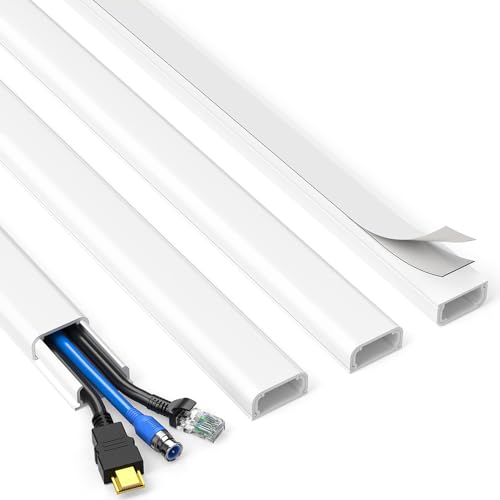
- Passing the UL94 V-0 Rating test, a plastics flammability standard released by Underwriters Laboratories of the United States, UL94 V-0 Rating is defined as Burning stops within
- Organize Messy Cables Neatly: Use the Delamu TV cord hider, a cord covers for wires on wall that will make your house look neat, to hide and organize conspicuous wires in your
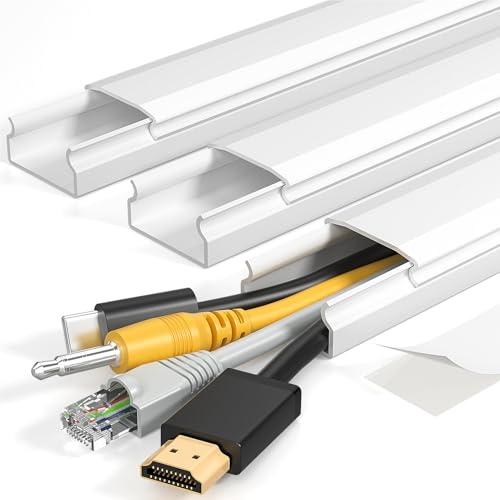
- Bye bye messy TV wires! Hung your TV up but the HDMI and Internet cords are dangling down. The clutter of wires is really hard to look at. The wires are directly exposed and
- Good for length for TV walls! Whether you have a high or low hanging wall mounted TV, the Yecaye CMC02 cord hider will work well for your wall mounted TV hidden wire needs. You
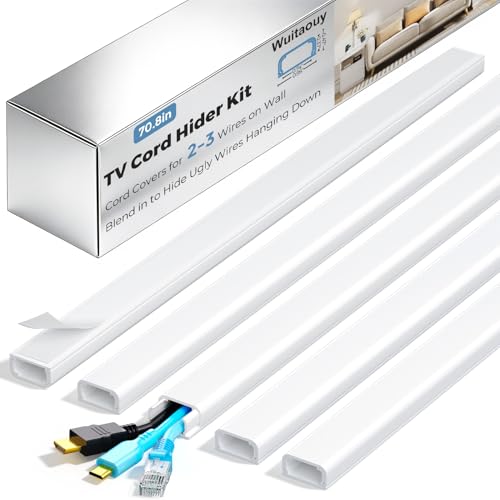
- Kit Content & Dimensions: Each Wuitaouy square-round TV cord hider kit includes 5 premium cord cover raceways, single size 14.2in L x 0.94in W x 0.47in H. This TV cable hider
- Easy Installation, No Drilling Required: This TV cord hider wall cuts out complex setups—no screws, no drilling needed! Pre-applied with strong adhesive foam tape, just Wipe the
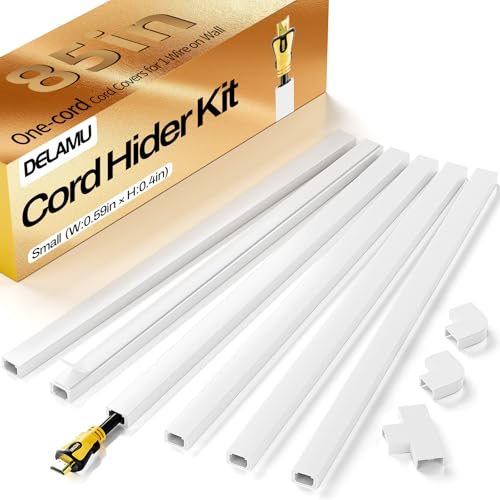
- Messy and Electric Hazard Solved: A cable dangling under the TV, a cord in the ceiling, a wire straying in the corner, these troublesome cables are unsightly and dangerous. DELAMU
- Design to Hide 1 Cord: Delamu, your wire expert, designed this one wire covers for cords on wall to provide the most suitable wall cord cable hider for a home or office that only
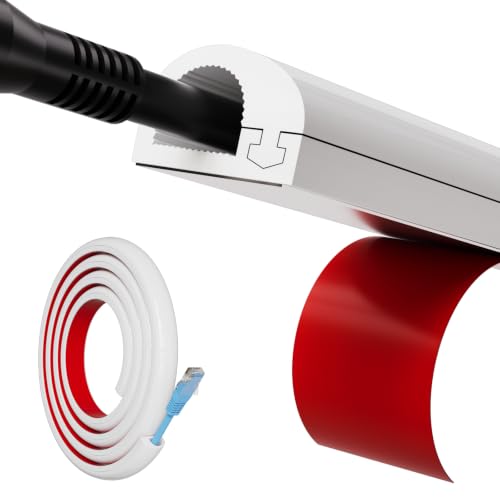
- Single-Side Opening Design: Wire mold upgraded opening design - single side opening, allowing you to add or remove a line more freely and flexibly.Snap design,the wire will not
- Cord Hider for One Wires: Our cable track is best suited for one wire (up to 1/4"), including TV cables,lamp cables,monitoring cables,telephone cables,network cables,charging
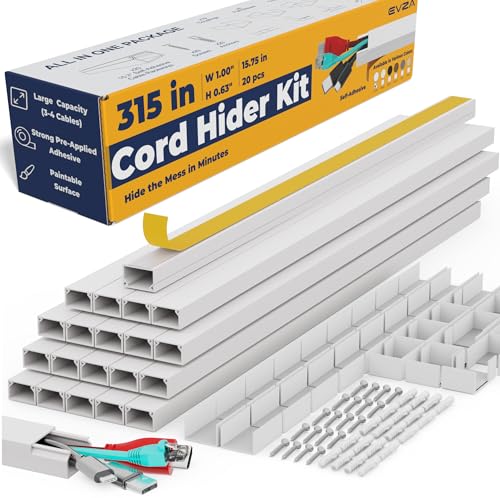
- Hide TV Cords for Wall Mount TV : Evza cord hider that will make your house tidy and safe. Install the cable hider and hide the electrical wires for the TV on the wall right away
- Paintable, Cuttable and Self Adhesive Tape Cord Concealer : Evza cord cover wall comes with strong adhesive mounting tape on backside. For a perfect match, you can paint the tv
The three ways to do this
1. Surface raceway (easiest, reversible). A plastic or silicone channel sticks to the wall, swallows the cords, and gets painted to match. No drilling, no drywall dust, renter-friendly. This is what everything below is.
2. In-wall cable pass-through. Two recessed brackets, one behind the TV, one behind the console. Low-voltage cables (HDMI, Ethernet) can legally run inside a wall; a standard TV power cord generally cannot — you need an in-wall-rated power kit or a new outlet behind the TV. Don't skip that distinction.
Finding the right how to hide tv wires and cables comes down to matching the features to how you will actually use it.
3. Furniture that eats the problem. A console with a wire-management cutout and a back panel hides everything below the TV. It does nothing for the visible drop between TV and console, which is why most people end up combining this with option 1.
Who a paintable raceway is for
You mounted the TV yourself, the cords are hanging in plain sight, and you want it fixed this afternoon without opening the wall. You have smooth, flat drywall. You're renting, or you don't want to commit to cutting holes. You have kids or pets and want the cords fully enclosed so nobody yanks or chews them.
It's also the right call if you're not sure your TV placement is permanent. Adhesive raceway comes off; a recessed outlet does not.
Who should skip it
Textured, brick, or stone walls. Adhesive foam tape needs a smooth surface. The Wuitaouy listing says outright that it's for flat, smooth walls and not textured ones, and the KNEELISA listing notes its tape isn't suitable for textured or rough surfaces. On a stone fireplace surround, adhesive raceway will peel — sometimes in a week, sometimes in July when the room gets hot. Route the cords around the stone onto adjacent drywall, or go in-wall.
Anyone who wants zero visible line. Even a painted raceway is a slightly proud strip on the wall. In raking light you'll see it. If "invisible" is the requirement, budget for in-wall work instead.
Thick bundles. A soundbar, console, streaming box and TV power can be five or six cables. The 0.94in × 0.47in channels are rated for 2–3 wires. Count first.
The fireplace problem specifically
Above-fireplace runs are the hardest version of this job, for three reasons.
The run is long — from behind a high TV, down past the mantel, to an outlet that's usually off to one side. That means corners, which means you want elbow and T fittings rather than a plain straight channel.
The mantel is in the way. You either stop the raceway at the mantel and pick it up underneath, or you jog sideways. Plan the path with painter's tape on the wall before you peel any adhesive.
Heat. Gas and wood fireplaces push a heat plume straight up the wall. Keep cables and adhesive out of the hottest zone above the firebox opening, and prefer a channel with a stated flame-retardant rating — the Delamu 2-3 wire raceway lists UL94 V-0, and the KNEELISA silicone channel is described as flame-retardant silicone. Check your fireplace manufacturer's clearance specs; they override any generic advice.
Honest trade-offs
Cheap raceway is cheap for a reason: the plastic is thin, and if you cut it badly the seams show. Painting helps enormously and most people skip it — that's the single biggest difference between "hidden wires" and "a white stripe on a beige wall." Two coats, same paint as the wall, done before you stick it up.
Adhesive is one-shot. Position it wrong and pulling it off can take paint with it. Measure, dry-fit, then commit.
And silicone versus rigid PVC is a real fork: silicone bends around a curve but can't be painted, so it only disappears on a white wall.
What to check on the listing before you buy
- Current price and pack size. These kits get repackaged constantly. The listed prices here — $6.98 to $23.74 — move, and "4 pcs" vs "5 pcs" changes what you actually receive.
- The variant you're clicking. Most of these come in multiple widths and colors. The channel dimensions above apply to the specific variant named; a different size in the same listing is a different product.
- Total length vs. your measured run. Measure floor to TV, add corners, add 20%.
- Warranty and returns. Confirm the seller's return window on the listing itself, and read recent reviews yourself — adhesive quality is the thing owners complain about most, and it's worth seeing what current buyers say rather than taking anyone's word for it.
Yecaye TV Cord Hider, 42in Cord Cover, Large Cable Hider, Wire Covers for 4 Cords, Cable Raceway Wire Hider, Wire Hiders for TV on Wall, Cable Cover Cord Concealer, W1.18in H0.6in, White — consider instead if…
…you have four cords, not three. At 1.18in wide and 0.6in tall with a 0.52in-wide interior, this is the widest channel in the group, and the listing rates it for 3–4 wires including HDMI, TV power and Ethernet. It installs by sliding on or snapping on, which helps in the cramped space directly under a wall-mounted TV. Yecaye TV Cord Hider, 42in Cord Cover, Large Cable Hider, Wire Covers for 4 Cords, Cable Raceway Wire Hider, Wire Hiders for TV on Wall, Cable Cover Cord Concealer, W1.18in H0.6in, White is $6.98 for 42 inches.
Wuitaouy TV Cord Hider, 70.8in Cord Covers for 2-3 Wires on Wall, Paintable Cable Hider Wire Covers for Cords on Wall, Self-Adhesive Cord Hider for Wall Mount Tv to Hide Cords, W0.94 H0.47in, White — consider instead if…
…you need length on a budget. Five 14.2in raceways gives you 70.8in total for $7.99 — enough for a tall run without buying two kits. Cuttable with scissors or a utility knife and paintable. Wuitaouy TV Cord Hider, 70.8in Cord Covers for 2-3 Wires on Wall, Paintable Cable Hider Wire Covers for Cords on Wall, Self-Adhesive Cord Hider for Wall Mount Tv to Hide Cords, W0.94 H0.47in, White is smooth-wall only, per the listing.
Cord Hider, Wire Cover, Cord Covers Wall Mounted TV, Cable Hider, 315 in Paintable White Raceway Kit, Electrical Cords Concealer, Cable Management, Hide Cords Wall, Wire Molding, Adhesive Channel — consider instead if…
…this is the fireplace job. 315 inches of channel in 15.7in sections, plus couplings and flat, T, inside and outside elbows — that's the fitting set you need to turn corners around a mantel cleanly. Capacity is stated as up to 1in wide by 0.63in high, roughly two HDMI plus two USB/AUX cables, and it can be installed with tape or with drywall anchors and screws. Cord Hider, Wire Cover, Cord Covers Wall Mounted TV, Cable Hider, 315 in Paintable White Raceway Kit, Electrical Cords Concealer, Cable Management, Hide Cords Wall, Wire Molding, Adhesive Channel is $23.74.
Delamu Cord Hider, Cord Covers for Wires on Wall, One-Cord Cable Hider, Self-Adhesive Wire Hiders Wire Covers for TV Cords on Wall, Easy Mount Cable Cover Management Kit, 6X W0.59 H0.4in, White — consider instead if…
…there's genuinely one cord. At 0.59in × 0.4in it's noticeably slimmer than the 0.94in channels, so it hides better — and the kit includes 6 raceways, 2 flat elbows and a T-connector for splitting a run. Delamu Cord Hider, Cord Covers for Wires on Wall, One-Cord Cable Hider, Self-Adhesive Wire Hiders Wire Covers for TV Cords on Wall, Easy Mount Cable Cover Management Kit, 6X W0.59 H0.4in, White is $7.99 and paintable.
39" Side Open One Cord Hider (<1/4") for Wall Mounted Tv,Silicone Flexible — consider instead if…
…you need to bend around something, or you expect to swap the cable often. The side-opening snap lets you add or pull a wire without removing the channel, and the flame-retardant silicone body cuts with scissors and follows a curve. It fits one cord up to 1/4in and, per the listing, does not support painting — so it works on a white wall and stands out on anything else. 39" Side Open One Cord Hider (<1/4") for Wall Mounted Tv,Silicone Flexible is $7.99.
FAQ
Can I run my TV's power cord inside the wall? Not a standard power cord — it isn't rated for in-wall use. Low-voltage cables like HDMI and Ethernet generally are. The compliant fix is an in-wall power relocation kit or a new outlet behind the TV, installed by an electrician.
Will adhesive raceway pull the paint off when I remove it? It can. Warming the strip gently and peeling slowly at a shallow angle helps. Assume you'll need touch-up paint, and don't stick it to freshly painted walls that haven't fully cured.
How do I hide cords above a fireplace with a stone or brick surround? Adhesive won't hold reliably on rough masonry. Run the raceway on the adjacent drywall and cross behind the mantel, or route the cables inside the wall cavity with recessed plates above and below.
Do I paint before or after installing? Before. Paint the channel and lid separately, let them cure fully, then peel and stick. Painting in place gets paint into the snap seam and makes the lid hard to reopen.
Related guides
- Best TV stands and media furniture - TV stands, entertainment centers, media consoles, TV wall mounts, floating media shelves, gaming desks, audio racks, cable management for First-Time Buyers
- Best TV stands and media furniture - TV stands, entertainment centers, media consoles, TV wall mounts, floating media shelves, gaming desks, audio racks, cable management with Past Challenges
- Privacy Policy
Key Takeaways
- Choosing the right how to hide tv wires and cables means matching the key features to your specific needs and budget
- Read real customer reviews and check the return policy before you commit
- Compare value across models — the priciest option is not always the best fit