What goes wrong
| Failure | Symptom | Fix |
|---|---|---|
| Plastic anchors in drywall | Shelf tilts forward over weeks; small crumbs of gypsum on the floor below | Remove, patch, re-mount into studs or snap-toggles |
| Missed the stud by half an inch | Screw spins freely or bites then loosens | Move the whole bracket to the confirmed stud centre; don't try to "grab the edge" |
| Overloaded shelf | Visible bow in the middle, glass shelf flexing under a receiver | Move heavy gear to a floor console; keep shelf duty to consoles, routers, players |
| Heat trapped under the TV | Console fans running loud, thermal shutdowns | Increase clearance, leave the sides open, never box the shelf in |
| Cables pulling the shelf | Gear creeps toward the wall edge; cords taut | Add slack and a service loop before you tighten anything |
| Cheap toggles into old plaster | Anchor pulls a cone of plaster out on first load | Plaster and lath needs screws into the lath or a full stud mount |
Quick answer: Find your studs first, mount into them if you can, and if you can't, use proper toggle bolts rated well above the weight of your gear — not the plastic anchors that came in the box. Most floating media shelf failures are anchor failures, not shelf failures. Budget an hour, use a level twice, and route your cables before the shelf goes on, not after.
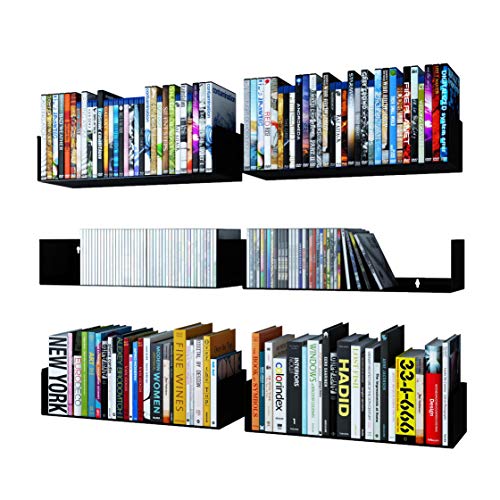
- Display Beautifully: It doesn't matter whether you're a bookworm or a movie lover, hang Bali black shelf set of 6 and enjoy tidying up your collection while accentuating your
- Functional and Stylish Design: Storing your precious collection in your limited space and enhancing your wall decor at the same time is no more hassle. Wallniture Bali u shaped
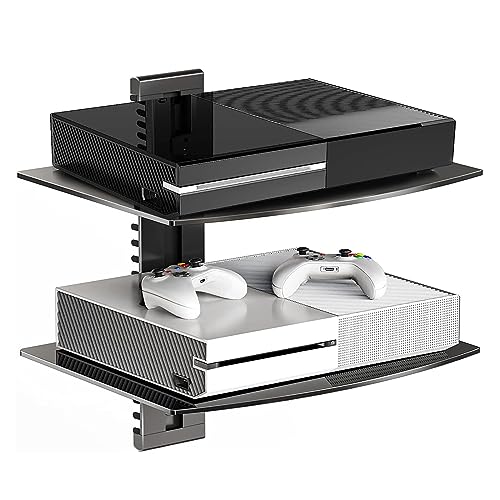
- EASY EXPANSION: The tv floating shelves wall mounted AV rack’s interlocking brackets make it easy to join multiple units together, giving you the freedom to add as many as needed
- HEIGHT ADJUSTABLE: Post-installation height adjustments can be made to the wall mounted AV rack to ensure your devices are exactly where you want them. Position the AV wall
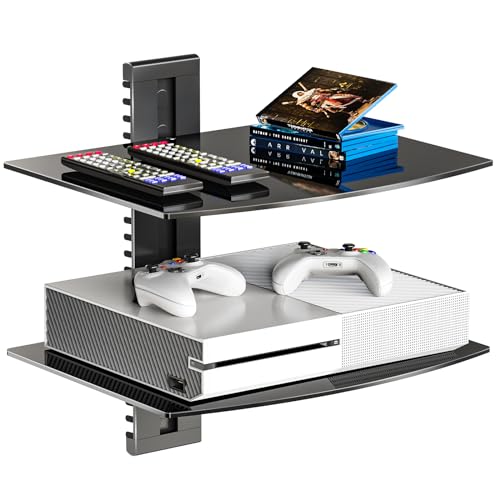
- Sturdy Glass Floating Shelves: Large Strengthened Tempered Glass Shelf (Each glass measures 15 inch x 11 inch x 4mm thick), supporting a maximum weight up to 8kg (17.6lbs) per
- 2 Tiers Height Adjustable: Elegant floating shelf for under tv shelf (with adjustable height) to free up floor space and enhance the look of your entertainment system
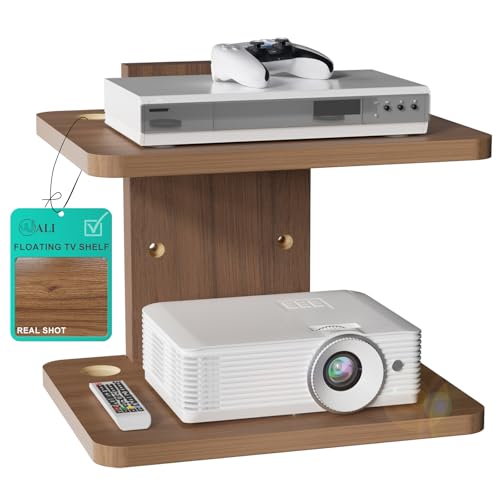
- Enhanced Features: Each sturdy Walnut Brown shelf boasts generous dimensions (13.78 x 11.02 inches, 0.59 inches thick), Supports max weight of up to 10kg (22 lbs)
- Efficient Cable Management: Walnut Brown floating media shelf is equipped with two wire holes on both sides, facilitating organized placement and management of equipment wires
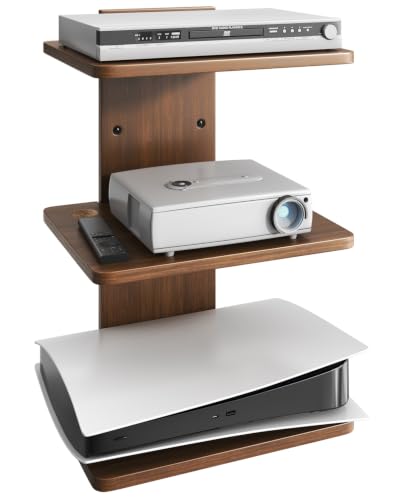
- 100% WOODEN : Each of the 3 shelves measures 13.78"L x 11.02"W x 0.59"H and supports up to 22 lbs. Perfect for your projector, media devices, or decorative pieces
- BUILT-IN CABLE MANAGEMENT : One wire hole on each side keep cords tidy and organized. No more messy cables hanging down from your floating wall shelf
What you need before you start
- A stud finder (a magnet on a string works in a pinch — it finds the drywall screws, and the stud is behind them)
- A drill with a bit matched to your anchor, not "whatever's in the case"
- A real bubble level, or a laser level if you have one
- Pencil, tape measure, painter's tape
- Toggle bolts or snap-toggles if you're going into hollow drywall
- Masonry bit and sleeve anchors if you're going into brick or concrete
Step-by-step
1. Decide the height before you touch a drill. Sit down on your actual couch. The shelf should sit below your sight line to the TV and above anything you'll bump with your knee. If the shelf is going under a wall-mounted TV, leave at least 4–6 inches of clearance under the TV's bottom edge so the mount's tilt range isn't blocked and so heat from the panel isn't sitting on your equipment.
Gotcha: people mount the shelf and then discover the TV mount's arms swing into it. Extend the TV mount fully before you mark anything.
Finding the right how to install floating media shelves comes down to matching the features to how you will actually use it.
2. Find the studs and mark them. Studs are typically 16 inches on center, sometimes 24. Mark both edges of the stud, then mark the center between them. Put painter's tape over the marks — it protects the paint and gives you something to write on.
Gotcha: stud finders lie near electrical boxes and metal corner bead. If the reading is wide and mushy, confirm with a small finish nail in a spot the shelf will cover.
3. Route the cables first. Whatever you're doing about cords — in-wall pass-through kit, raceway, or just tucking them through the shelf's cable holes — do it now. Fishing an HDMI cable behind a shelf that's already bolted to the wall is a bad afternoon.
Gotcha: only in-wall-rated (CL2/CL3) cable belongs inside a wall cavity. Power cords for AV gear generally do not — use a proper in-wall power kit if you're going that route.
4. Mark and check, then check again. Hold the wall plate or bracket up, level it, and mark every hole. Then move the bracket away and measure your marks against the ceiling and the floor. If the ceiling is out of level (many are), a perfectly level shelf will look crooked. Split the difference — the eye reads "parallel to the ceiling line" as level.
5. Drill. Into studs: pilot hole slightly smaller than the lag screw's shank. Into drywall: drill the full anchor diameter, and use toggles, not the conical plastic plugs. Into concrete or brick: masonry bit on hammer setting, drill into the brick body rather than the mortar joint if the brick is sound.
Gotcha: drilling at a slight upward angle into drywall is very common and it halves your holding power. Keep the drill dead perpendicular.
6. Mount the bracket and torque sensibly. Snug is enough. Overtightening a lag into a stud strips the wood; overtightening a toggle crushes the drywall face and the anchor spins forever afterward.
7. Attach the shelf and load it low-to-high. Heaviest item closest to the wall and centred over a fastener. Put the load on, then re-level. Some bracket systems have adjustable shelf height along a track, so a small correction is possible after the fact.
8. Live with it empty for a day. Pull down gently on the front edge before you trust it with a console. If anything creaks or shifts, take it down and redo the anchoring.
Spec and compatibility table
| Product | Price | Tiers | Stated load | Shelf size | Cable management | Wall types stated |
|---|---|---|---|---|---|---|
| Wallniture Bali Black U Shape Floating Shelves for Wall, CD DVD Storage Shelves and Metal Bookshelf Set of 6 | Check price on Amazon | 6 shelves | Not stated | Not stated | Not stated | Not stated |
| Suptek Glass Floating Shelves, TV Wall Mount with Shelf for DVD Player / PS4 / Cable Boxes/Game Consoles/Sky Box/TV Accessories, Flat Black 2-Tier Wall Mount Bracket | Check price on Amazon | 2 | 17.6 lbs per shelf | Not stated | Routes along wall plate, end-cap openings | Wood stud, concrete, drywall |
| WALI Floating TV Shelf, 2 Tier Glass Projector Shelf for DVD Players, Routers, Game Consoles, Cable Boxes, Living Room Decor, Wall Mount Shelves Hold Up to 17.6lbs (CS202B), 2-Shelf, Black | Check price on Amazon | 2 | 17.6 lbs per shelf | 15" x 11" x 4mm glass | Built-in, both sides | Not stated |
| WALI Floating TV Shelf, 2 Tier Projector Shelf for DVD Players, Routers, Game Consoles, Cable Boxes, Living Room Decor Accessories, Wall Mount Shelves Holds Up to 22lbs (CS202N), 2-Shelf, Walnut Brown | Check price on Amazon | 2 | 22 lbs | 13.78" x 11.02" x 0.59" | Two wire holes each side | Drywall (no overloading) |
| WALI Floating TV Shelf, 1 Tier Glass Projector Shelf for DVD Players, Routers, Game Consoles, Cable Boxes, Living Room Decor, Wall Mount Shelves Hold Up to 17.6lbs (CS201B), 1-Shelf, Black | Check price on Amazon | 1 | 17.6 lbs | 15" x 11" x 4mm glass | Built-in, both sides | Not stated |
| Floating TV Projector Shelf Wall Mount - 3 Tier Wooden Shelf, Walnut Brown | Check price on Amazon | 3 | 22 lbs per shelf | 13.78" x 11.02" x 0.59" | Two wire holes each side | Drywall, wood stud, brick, concrete |
When the fix is a new one
Sometimes the install isn't the problem — the shelf is wrong for the wall, the gear, or the cable run. These are worth reading the listings on before you re-drill.
Suptek Glass Floating Shelves, TV Wall Mount with Shelf for DVD Player / PS4 / Cable Boxes/Game Consoles/Sky Box/TV Accessories, Flat Black 2-Tier Wall Mount Bracket — for installs you'll want to expand later
The listing describes interlocking brackets that join multiple units together, so you can add capacity without re-drilling a new wall plate elsewhere. It also states height adjustment after installation using a provided wrench, which is genuinely useful if your first guess at spacing is wrong. Mounting is stated for a single wood stud, concrete, or drywall. See the Suptek Glass Floating Shelves, TV Wall Mount with Shelf for DVD Player / PS4 / Cable Boxes/Game Consoles/Sky Box/TV Accessories, Flat Black 2-Tier Wall Mount Bracket listing for current hardware details.
WALI Floating TV Shelf, 2 Tier Projector Shelf for DVD Players, Routers, Game Consoles, Cable Boxes, Living Room Decor Accessories, Wall Mount Shelves Holds Up to 22lbs (CS202N), 2-Shelf, Walnut Brown — when 17.6 lbs isn't enough headroom
This one is rated to 22 lbs with 0.59-inch-thick walnut brown shelves at 13.78 x 11.02 inches, and the listing explicitly says it can work on drywall with the caveat of no overloading. If your gear was borderline on a glass shelf, the extra margin matters. Details on the WALI Floating TV Shelf, 2 Tier Projector Shelf for DVD Players, Routers, Game Consoles, Cable Boxes, Living Room Decor Accessories, Wall Mount Shelves Holds Up to 22lbs (CS202N), 2-Shelf, Walnut Brown page.
Floating TV Projector Shelf Wall Mount - 3 Tier Wooden Shelf, Walnut Brown — for brick, concrete, or three separate boxes
The listing states compatibility with drywall, wood stud, brick, and concrete, with hardware for each wall type included — which removes the usual hardware-store trip when you're mounting to masonry. Three shelves at 22 lbs each and adjustable mounting height. Read the Floating TV Projector Shelf Wall Mount - 3 Tier Wooden Shelf, Walnut Brown listing for the hardware breakdown.
WALI Floating TV Shelf, 1 Tier Glass Projector Shelf for DVD Players, Routers, Game Consoles, Cable Boxes, Living Room Decor, Wall Mount Shelves Hold Up to 17.6lbs (CS201B), 1-Shelf, Black — when you only ever needed one shelf
One tempered glass shelf at 15 x 11 inches, 4mm thick, rated to 17.6 lbs, on a 3-inch wall plate that the listing says protrudes 19mm from the wall. Fewer holes, less to level. The WALI Floating TV Shelf, 1 Tier Glass Projector Shelf for DVD Players, Routers, Game Consoles, Cable Boxes, Living Room Decor, Wall Mount Shelves Hold Up to 17.6lbs (CS201B), 1-Shelf, Black page has the full package contents.
WALI Floating TV Shelf, 2 Tier Glass Projector Shelf for DVD Players, Routers, Game Consoles, Cable Boxes, Living Room Decor, Wall Mount Shelves Hold Up to 17.6lbs (CS202B), 2-Shelf, Black — the glass version of the same 3-inch plate
Two tempered glass shelves at 15 x 11 inches, 17.6 lbs each, with cable management on both sides and the same 19mm wall projection. Height is adjustable. Full spec on the WALI Floating TV Shelf, 2 Tier Glass Projector Shelf for DVD Players, Routers, Game Consoles, Cable Boxes, Living Room Decor, Wall Mount Shelves Hold Up to 17.6lbs (CS202B), 2-Shelf, Black listing.
Wallniture Bali Black U Shape Floating Shelves for Wall, CD DVD Storage Shelves and Metal Bookshelf Set of 6 — for disc and game collections rather than components
A set of six U-shaped metal shelves aimed at books, magazines, video games and DVDs, arriving fully assembled with mounting hardware and a mini level included. That's a different job from holding a console — it's wall storage for the collection around the TV. See the Wallniture Bali Black U Shape Floating Shelves for Wall, CD DVD Storage Shelves and Metal Bookshelf Set of 6 listing, and check current buyer reviews yourself for real-world load impressions.
FAQ
Can I mount a floating media shelf into drywall with no studs? Yes, with the right anchor. Snap-toggles or strap toggles spread load across the back of the drywall and hold far more than the conical plastic plugs bundled with most kits. Hit a stud if one is anywhere near your marks — it's always stronger.
How far below the TV should the shelf go? Enough clearance that the TV mount can tilt and that heat isn't trapped — typically 4–6 inches minimum, more if your mount articulates. Extend the mount fully before marking holes.
Glass or wood shelves? Glass looks lighter and disappears visually; wood tends to carry more in these listings (22 lbs versus 17.6 lbs among the products above) and hides fingerprints. Match the material to the load, not the look.
Do I need to re-level after loading the shelf? Check it, yes. Several of these systems allow post-installation height adjustment along the bracket, so small corrections don't mean new holes. If the shelf droops rather than sits crooked, that's an anchor problem, not a leveling one — take it down.
Related guides
- Best TV Stands for 65-Inch TVs
- Best Cable Management Solutions for TV Stands
- Best TV stands and media furniture - TV stands, entertainment centers, media consoles, TV wall mounts, floating media shelves, gaming desks, audio racks, cable management for Small Business Owners
Key Takeaways
- Choosing the right how to install floating media shelves means matching the key features to your specific needs and budget
- Read real customer reviews and check the return policy before you commit
- Compare value across models — the priciest option is not always the best fit