As an Amazon Associate this site earns from qualifying purchases.
Specification comparison
| Model | Stated TV size | Dimensions (W × D × H) | Built-in power | Lighting | Load capacity | Price |
|---|---|---|---|---|---|---|
| WLIVE TV Stand for 75/70 Inch TV | Up to 75" | Not stated | Integrated power outlets | Not stated | Not stated | Check price on Amazon |
| Bestier LED Tall Entertainment Center | 55/60/65" | Not stated | Not stated | 7 colors, 22 modes, RGB remote | 160 lb top shelf | Check price on Amazon |
| Furinno Jaya Large Entertainment Center | Up to 55" | 47.24 × 15.87 × 19.53 in | Not stated | Not stated | 50 lb top, 15 lb middle, 15 lb bottom center, 20 lb each side shelf, 120 lb total | Check price on Amazon |
| Furinno Jaya Toolless Assembly TV Stand | Up to 55" | 47.63 × 15.55 × 22.79 in | Not stated | Not stated | 40 lb top, 20 lb lower shelf, 80 lb total | Check price on Amazon |
| Aquzee Video Game Console Shelf | Not stated | Not stated (top 2 shelves fit 17.6" wide gear; bottom 2 fit under 16.1") | 3 AC outlets, 2 USB ports | RGB strip, USB powered | Over 50 lb per tier | Check price on Amazon |
| YGEOMER Entertainment Center for TVs Up to 50 Inch | Title says up to 50"; features state 55" | 47.2 × 11.8 × 21.6 in | 2 AC, 2 USB, 1 USB-C | Changeable LED colors | Not stated | Check price on Amazon |
Quick answer: Organizing an entertainment center is mostly a zoning problem, not a storage problem — put daily-use gear at eye level, heat-producing consoles where air can move, and everything else behind a door or in a bin. Cables get bundled and routed through the back cutouts once, not re-tangled every time you add a device. If your current unit has no outlet, no cable holes, and no adjustable shelves, no amount of tidying will hold, and swapping the furniture is the real fix.
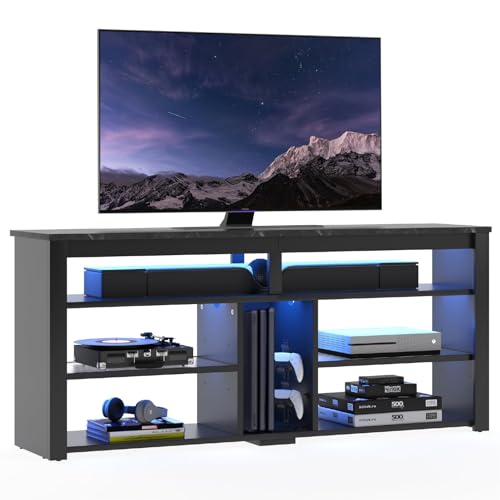
- Chic High TV Console with LED Lights: Upgrade your living-room with our visually stunning TV console. The sleek design, paired with Acrylic shelves, creates a unique ambiance that
- Entertainment Center with Storage: Unveil a smart storage solution with our TV cabinet, featuring open storage space and adjustable shelves to cater to your diverse storage needs
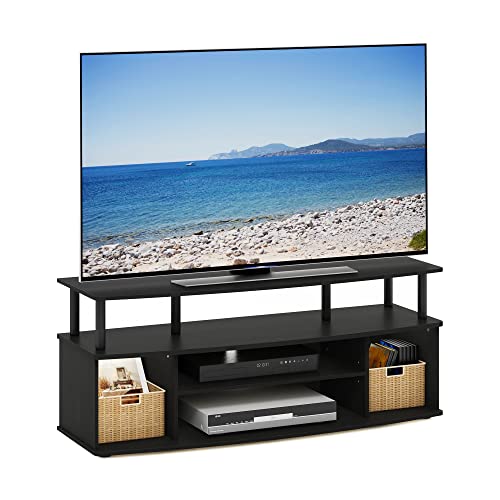
- SIMPLE STYLISH DESIGN: This TV stand features simple stylish design that comes in multiple color options, functional and suitable for living rooms, bedrooms, or apartments
- SPACIOUS STORAGE OPTIONS: This entertainment center includes wide, easy-access shelves to hold media players, game consoles, routers, and decor without doors getting in the way
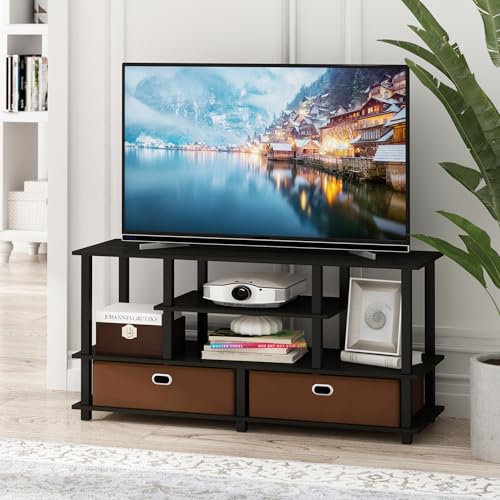
- 4-TIER MEDIA SETUP: Need TV storage with room for devices and hidden clutter? This wide TV stand features a 4-tier layout, open frame design, 2 tall shelf spaces, and 2 fabric
- QUICK TOOLLESS ASSEMBLY: This rectangular entertainment center is designed with a simple toolless structure, helping setup stay quick and straightforward. The package includes
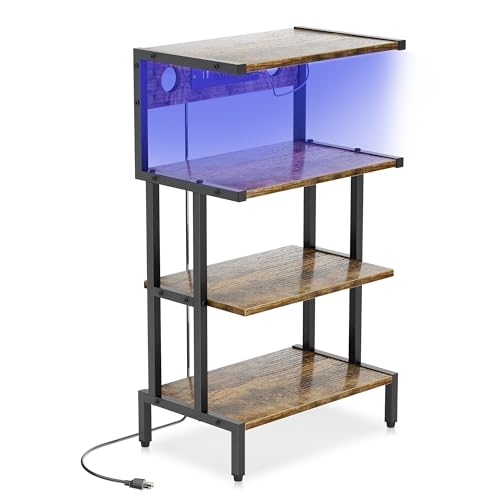
- Game Console Shelf - 【With Outlet & Light Strips】 The game console stand with 3 AC outlets and 2 USB ports outlet, which convenience for your game console, audio equipment and
- Media Stand - 【Storage Your Media Devices】The 4-tier AV meida stand is prefect for orgainzer your small stereo system, speakers DVD, audio components, this audio-video shelving
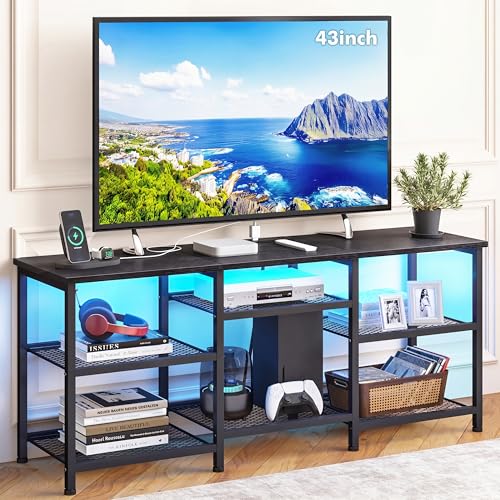
- TV Stand with Charging Station: Our charging station has 2AC, 2USB, 1Type-C, it can meet most of your electricity demands. We also have changeable LED lights, you can choose
- Product Size: TV stand is 47.2inch in length, 11.8inch in width and 21.6inch in height, suitable for 55 inch TV
The zoning ideas that actually hold up
Before you buy anything, try re-arranging what you have around four zones:
- Hot zone — consoles, receivers, anything with a fan. Needs open shelving and a few inches of breathing room. Never bury a PS5 in a closed cabinet with no vent.
- Reach zone — remotes, controllers, headphones, charging cables. Should be grab-able without kneeling. Bins and drawers win here.
- Cold storage — discs, manuals, old cables, board games. Bottom shelves, closed doors, out of sight.
- Cable spine — one power strip or a built-in outlet, one bundle running down the back, and rear cutouts so nothing loops across the floor.
Prices shift constantly on these listings — treat the column as a ballpark, not a quote.
Finding the right how to organize entertainment center comes down to matching the features to how you will actually use it.
WLIVE TV Stand for 75/70 Inch TV, Entertainment Center with Storage & Power Outlet, Farmhouse Media Console Cabinet with Drawers and Adjustable Shelves for Living Room, Black
If you're organizing rather than just storing, this is the layout the four-zone system maps onto most cleanly. The WLIVE TV Stand for 75/70 Inch TV, Entertainment Center with Storage & Power Outlet, Farmhouse Media Console Cabinet with Drawers and Adjustable Shelves for Living Room, Black pairs two drawers and two side cabinets with open shelving, which gives you somewhere to hide remotes and cables and somewhere ventilated for a console. The shelves adjust, so gear of different heights doesn't force you into wasted air. Integrated power outlets plus rear cable cutouts mean the spine of your setup lives inside the furniture instead of snaking to a wall socket. It's stated to accommodate most TVs up to 75 inches, and the maker recommends two people for assembly.
Who it's for
- You have a 65–75 inch TV and a genuine pile of gear — console, soundbar, streaming box, router — that currently lives on the floor.
- You want closed storage. Drawers and cabinet doors are the only reliable way to keep remotes, chargers and clutter invisible.
- You're tired of an extension cord crossing the room and want the outlet inside the unit.
- You like a farmhouse/wood-grain look that doesn't read as gamer gear.
Who should skip it
- Small TVs and small rooms. A 75-inch-rated console under a 43-inch TV looks like a runway. Something narrower will organize the same gear in less floor space.
- Renters who move often. Cabinet-and-drawer units are heavier to disassemble and more fragile on the second build than open-frame stands.
- Tight budgets. At $169.99 it's the priciest option here by a wide margin, and a $42 open-frame stand plus $15 of bins solves a lot of the same problem.
- Anyone who wants RGB. No lighting is stated for this unit.
The honest trade-offs
Closed storage hides clutter but traps heat, so keep the console on an open shelf regardless of how tempting the cabinet looks. Adjustable shelves are the single most useful organizing feature and the one people ignore in product photos — measure your tallest component before you commit to a fixed-shelf unit. Built-in outlets are genuinely convenient, but they're still a pass-through to your wall socket: they don't add capacity, and they're one more component that can fail out of warranty. Finally, particle-board furniture in this price band is fine when loaded within spec and unforgiving when it isn't. Read the stated weight capacities — the two Furinno units publish theirs shelf by shelf, which is more transparency than most.
What to check on the listing before you buy
- Current price and variant. Colour and size options often sit on the same listing at very different prices. Confirm the variant selected is the one you want.
- Stated TV size vs. your TV's stand width. A "fits 55 inch" rating describes the panel, not the feet. Measure the leg span of your TV against the tabletop width.
- Dimensions where the table above says "Not stated." Pull them from the listing's own dimensions block before ordering.
- Warranty and returns window. Flat-pack furniture failures show up during assembly; know the return terms before the box arrives.
- Reviews and Q&A. Go read them yourself, sorted by most recent, and look specifically for comments about hardware quality and shelf sag.
Bestier LED Tall Entertainment Center for 55/60/65 inch TV — consider instead if…
…you want the lighting to be part of the design and you own a PlayStation. The Bestier LED Tall Entertainment Center for 55/60/65 inch TV, TV Stand with Storage for PS4 Xbox, Adjustable Shelf Media Console for Living Room, Black Marble has a 4-tier open storage layout with a middle compartment designed for PS consoles, a taller top section for long items like a soundbar, adjustable acrylic shelves, rear cord holes, and LEDs with 7 colours and 22 modes on an RGB remote. The top shelf is rated to 160 pounds.
Furinno Jaya Large Entertainment Center Hold up to 55-in TV, Inches, Blackwood — consider instead if…
…doors are the enemy. The Furinno Jaya Large Entertainment Center Hold up to 55-in TV, Inches, Blackwood is all wide, easy-access open shelving at 47.24 × 15.87 × 19.53 inches, with per-shelf ratings published (50 lb top, 15 lb middle, 15 lb bottom centre, 20 lb per side shelf, 120 lb static total). Composite wood with rounded corners — worth noting if there are toddlers in the room.
Furinno Jaya Toolless Assembly TV Stand for TV up to 55 Inch — consider instead if…
…you want the cheapest path to a tidier wall and you dread flat-pack. The Furinno Jaya Toolless Assembly TV Stand for TV up to 55 Inch, 4-Tier Entertainment Center, TV Console with 2 Storage Bins, for Living Room, Bedroom, Home Office, Black Espresso assembles without tools in roughly 30 minutes and ships with two fabric bins, which covers the "reach zone" clutter immediately. It's 47.63 × 15.55 × 22.79 inches with an open back for cable access.
Aquzee Video Game Console Shelf — consider instead if…
…your TV is already wall-mounted and you only need somewhere for the gear. The Aquzee Video Game Console Shelf, Stereo Racks - Media Stand with Outlet & Led Strip Light, 4-Tier Gaming Shelf for PS4 PS5 Xbox Games Organizer, Small Entertainment Center, AV Media Stand for CD DVD is a 4-tier rack with 3 AC outlets, 2 USB ports, a USB RGB strip and two rear cable holes. Top two shelves take gear up to 17.6 inches wide, the lower two under 16.1 inches, and each tier is rated over 50 lb.
YGEOMER Entertainment Center for TVs Up to 50 Inch — consider instead if…
…depth is your constraint. At 11.8 inches deep, the YGEOMER Entertainment Center for TVs Up to 50 Inch, Entertainment Stand with Power Outlet and LED Lights Open Storage Shelves, TV Console Table for Living Room and Bedroom, Black is the slimmest option here, with 2 tiers of open mesh shelves adjustable to three settings, 4 hooks for controllers or headphones, and a charging station with 2 AC, 2 USB and 1 USB-C. Note the listing title says up to 50 inch while the feature text says 55 — confirm on the listing before ordering.
FAQ
How do I get rid of an old entertainment center? In rough order of effort: post it free on a local buy-nothing group or Craigslist "free" section and let someone haul it (fastest for particle board, which has near-zero resale value); check whether a local charity or ReStore accepts flat-pack furniture — many don't; book a bulky-waste pickup through your municipality; or break it down with a screwdriver and a hand saw and put it out in pieces. Solid wood units are worth listing for money. Do this before the new one arrives, or you'll live with two for a month.
What does "gi entertainment center" mean — is that a brand? It's almost certainly a partial or mistyped search rather than a product line. If you're hunting a specific unit you saw, search the exact model number from the listing or the retailer's SKU instead of the abbreviation; none of the units covered here use that label.
Should the console go behind a cabinet door? No. Anything with a cooling fan belongs on an open shelf with clearance above it. Use the closed storage for discs, cables, manuals and remotes you're not currently holding.
How do I stop the cable mess from coming back? Label both ends of every cable with masking tape, bundle by device rather than by direction, and route through the rear cutouts once. The reason it re-tangles is usually that the power strip is loose behind the unit — fasten it to the back panel or use a stand with an integrated outlet so there's only one cord leaving the furniture.
Related guides
- Best Options for Best TV stands and media furniture - TV stands, entertainment centers, media consoles, TV wall mounts, floating media shelves, gaming desks, audio racks, cable management
- FAQ: Best TV stands and media furniture - TV stands, entertainment centers, media consoles, TV wall mounts, floating media shelves, gaming desks, audio racks, cable management
- Best TV stands and media furniture - TV stands, entertainment centers, media consoles, TV wall mounts, floating media shelves, gaming desks, audio racks, cable management Industry Trends
Key Takeaways
- Choosing the right how to organize entertainment center means matching the key features to your specific needs and budget
- Read real customer reviews and check the return policy before you commit
- Compare value across models — the priciest option is not always the best fit