What goes wrong, and how to tell
| Failure | Symptom | Fix |
|---|---|---|
| Desk too tall for your chair | Shoulders creep up, wrists bend upward, neck aches after 2 hours | Raise the chair, add a footrest; or use a keyboard tray to drop the typing surface |
| Monitor too low | You look down, then your head tilts forward; upper back tightness | Riser, monitor arm, or a desk with an integrated monitor shelf |
| Monitor too close | Eye strain, constant refocusing, you sit back reflexively | Push the screen back; if the desk is too shallow, move to an arm that clamps and extends |
| Tower on carpet | Fans loud, temps climb over months, dust visible at intakes | Move it to an under-desk rack or shelf with airflow clearance |
| Not enough outlets | Daisy-chained power strips, one strip doing everything | Desk with built-in outlets, or one high-quality surge strip mounted to the desk underside |
| Cables bundled by type | You unplug the wrong thing every time you swap a device | Rebundle by destination; label both ends |
| Wobble under keyboard slams | Monitor shakes on every keystroke | Tighten every bolt (they loosen after a week), check foot pads are level on uneven floor |
| LED strip glare | Screen reflections, washed-out contrast at night | Point strips at the wall, not at you; drop brightness — bias lighting should be dim |
Quick answer: Build your station around your body first, then your gear — chair height sets elbow height, elbow height sets desk height, and the monitor goes wherever your eyes land when you look straight ahead. Only after that do you route power, hide cables, and add lighting. Most "perfect gaming desk setup" photos you see online skip the ergonomics entirely and look great for about forty minutes.
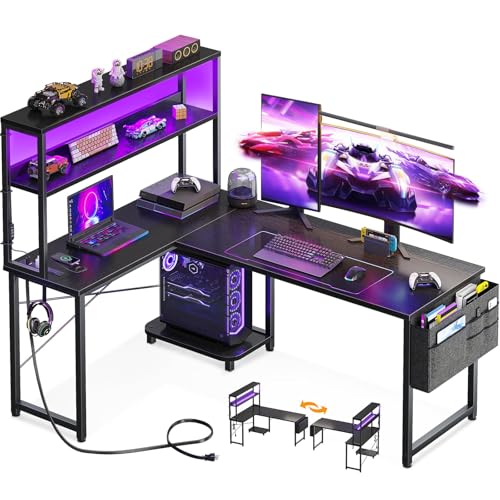
- 【Power Outlets & Charging Ports】 AODK computer desk is equipped with 3 power outlets & 2 USB charging ports for your electronic device. You can easily and conveniently charge
- 【Gaming Desk with Colorful LED Lights】This gaming desk features LED strip that contains 10 static colors, 8 brightness grades, 10 dynamic modes and memory function with switching
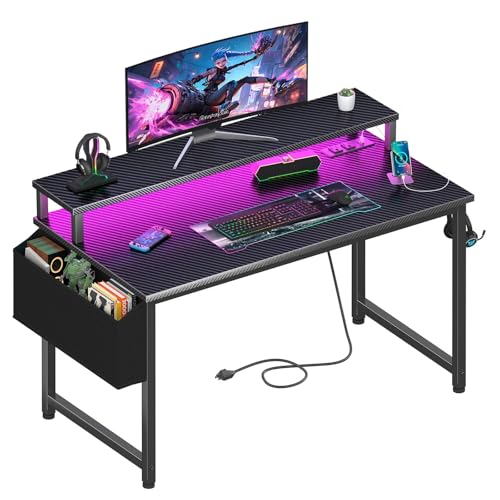
- Safety Multi-functional Power Strip: The computer desk includes a built-in power strip with 2 power outlets & 2 USB
- Gaming Desk With LED Lights: Equipped with a built-in RGB LED lights strips, the led gaming desk provides 7 adjustable colors, 4 dynamic modes, 16 static types, create different
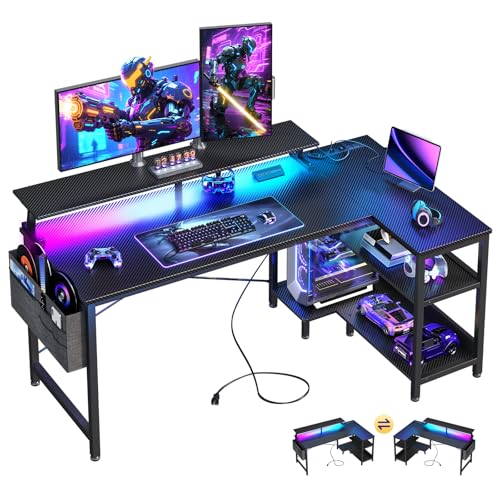
- 【USB Charging Ports & Power Outlets】The office desk is equipped with 3 power outlets and 2 USB charging ports for your electronic devices, you can easily and conveniently charge
- 【Gaming Desk with Colorful LED Lights】This gaming table features LED strip that contains 10 static colors, 6 brightness grades, 10 dynamic modes and memory function with switching
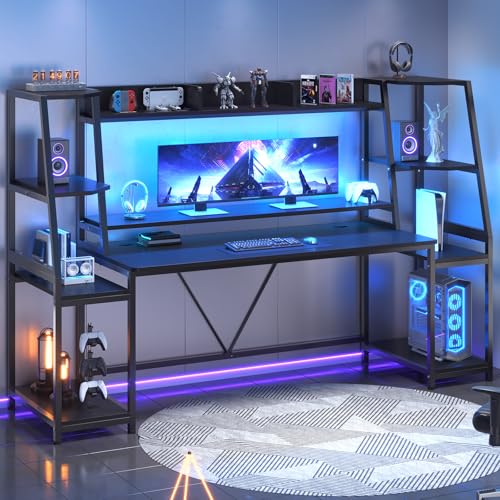
- 【Multifunctional Desk for Gamer】How do you make the perfect gaming station? This ergonomic gaming Computer desk comes with a monitor stand, LED lights, two large storage shelf
- 【Two Large Storage Shelves & Spacious Desktop】This gaming desk features 2 large storage shelves, use the 2 storage shelves for storing your large CPU / PC tower, books, speakers
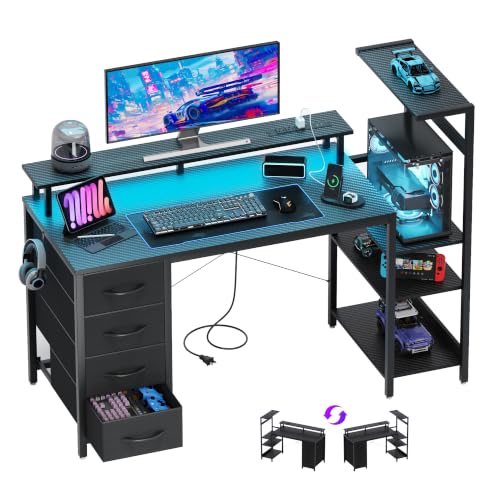
- Vibrant RGB LED & Charging Station: Transform your setup with built-in multicolor LED strips and set the perfect mood for gaming or streaming. Choose from various lighting modes
- Smart Storage & Space Optimization: Featuring 4 roomy fabric drawers, a side hook for your headset, and an open rack that fits even a full-size gaming PC tower, it keeps
The setup order that prevents rework
Do these in sequence. Skipping ahead is why people disassemble a desk twice.
1. Measure the corner or wall before you buy anything. Tape the footprint out on the floor. Gotcha: depth is the spec people forget. A 19–21 inch deep top puts a 27-inch monitor closer to your face than is comfortable unless the monitor is on a stand or arm that pushes it back. Check the depth number, not just the width.
Finding the right how to set up gaming desk station comes down to matching the features to how you will actually use it.
2. Set your chair before your desk. Sit with feet flat, knees at roughly 90 degrees. Wherever your forearms naturally rest is your target desk height. Gotcha: most fixed-height gaming desks land at 29–30 inches, which is tall for anyone under about 5'7". If you're shorter, you'll need a footrest and a raised chair — plan for it rather than discovering it later.
3. Decide standing vs. seated honestly. Searches for "standing desk gaming setup" spike, but a standing desk only helps if you'll actually stand. If you game seated for four-hour stretches, a fixed desk with a good chair beats a wobbly height-adjustable frame with a cheap chair. Gotcha: standing frames also flex more under a heavy monitor arm — if you go that route, prioritize frame rigidity over motor speed.
4. Place the PC tower before the monitor. Tower position dictates every cable run behind the desk. Under-desk shelf, floor, or side rack — pick one now. Gotcha: a tower on carpet on the floor eats dust and shortens fan life. An open rack or dedicated CPU stand off the floor is meaningfully better.
5. Set monitor height and distance. Top of the screen at or just below eye level, roughly an arm's length away. A monitor riser or the desk's own integrated stand does this for free. Gotcha: if you use a riser, your keyboard tray space shrinks — measure the clearance underneath before committing.
6. Anchor keyboard and mouse. Keyboard centered on your body, not centered on the desk. Mouse on the same plane, close in. Gotcha: people center the keyboard to the monitor, which is fine only if the monitor is centered to you.
7. Power last, and plan it. Count your plugs: PC, monitor(s), speakers, phone, headset dock, lamp, router. Then add two. Desks with built-in outlets and USB ports remove a whole tangle from under the desk. Gotcha: built-in strips still need one wall outlet — check the desk's cord reach to your wall plug before you position the desk.
8. Cable management, then lighting. Bundle by destination, not by type: everything going to the tower in one run, everything going to the wall in another. Velcro ties, not zip ties, so you can change a component without cutting anything. Lighting goes on absolutely last, because a light strip stuck down over a cable you later need to move is a small tragedy.
The bolt-tightening one deserves emphasis. Flat-pack desks arrive at final tension, then settle. Re-tighten everything about a week after assembly and most wobble complaints disappear.
Spec and compatibility table
| Product | Price | Shape / Width | Depth | Height | Power | LED | Storage |
|---|---|---|---|---|---|---|---|
| AODK L Shaped Desk Gaming Desk with LED Light & Power Outlet | Check price on Amazon | L-shaped, 53"W | 18.9" | 29.8" | 3 outlets, 2 USB | 10 static colors, 8 brightness grades, 10 dynamic modes, memory | 2 shelves, CPU stand, headphone hook, storage bag |
| Lufeiya Gaming Desk with Power Outlets and LED Lights, 40 Inch | Check price on Amazon | Straight, 40" | Not stated | Not stated | 2 outlets, 2 USB | 7 colors, 4 dynamic modes, 16 static types | Storage bag, 2 removable headphone hooks, monitor stand |
| ODK 48 Inch L Shaped Gaming Desk with LED Lights, Power Outlets, Black | Check price on Amazon | L-shaped, 48"W | 19.7" | 30" | 3 outlets, 2 USB | 10 static colors, 6 brightness grades, 10 dynamic modes, memory | Under bookshelf, storage shelves, side storage bag, hook |
| SEDETA 79'' Gaming Desk with LED Lights, Hutch and Storage Shelves, Black | Check price on Amazon | 79" overall; 55" desktop | 21.6" | Not stated | Not stated | RGB strip, app remote, 60000+ colors, 29 modes, music sync, timer | 2 large shelves, hutch, CPU holder, monitor stand |
| DurayLoly 39.3" Gaming Desk with Power Outlet and LED Lights | Check price on Amazon | Straight, 39.3" | Not stated | Not stated | 2 outlets, 2 Type-C | 20 static colors, 22 dynamic modes, memory | Fabric drawer, 4-position host stand, 2 hooks |
| 51 Inch Gaming Desk with Drawers & PC Tower Stand & LED Lights, Black | Check price on Amazon | Straight, 51" | Not stated | Not stated | Multiple USB ports and outlets | Multicolor strips, multiple modes and brightness levels | 4 fabric drawers, side hook, open PC tower rack |
When the fix is a new desk
If your current surface is the actual bottleneck — too shallow for the monitor, no room for the tower, nowhere to plug anything in — these are options with their specs laid out. Read current buyer reviews yourself before ordering; they're the fastest way to spot assembly and finish complaints.
AODK L Shaped Desk Gaming Desk with LED Light & Power Outlet — reversible corner layout
The hutch mounts on either the left or right side, so the same desk works in a left-hand or right-hand corner. That flexibility matters if you might move rooms. It's 18.9" deep with a 53" width, includes a CPU stand, headphone hook, storage bag, and two shelves that install either as a display shelf or a monitor stand. Three outlets and two USB ports handle the plug problem. See the AODK L Shaped Desk Gaming Desk with LED Light & Power Outlet listing for current details.
ODK 48 Inch L Shaped Gaming Desk with LED Lights, Power Outlets, Black — the deepest corner option here
At 19.7" deep and 30" high with a 48" main desk, this one's built on a metal frame with MDF board and includes adjustable non-slip foot pads — useful on the uneven floors that cause most wobble. The under-bookshelf handles a PC case. Full spec on the ODK 48 Inch L Shaped Gaming Desk with LED Lights, Power Outlets, Black page.
SEDETA 79'' Gaming Desk with LED Lights, Hutch and Storage Shelves, Black — for two-machine or console-plus-PC setups
The widest here at 79" overall with a 55" x 21.6" desktop, and the deepest surface in this group, which solves the monitor-too-close problem outright. Two large shelves are sized for a PC tower, speakers, and consoles. Its LED strip is app-controlled with music sync and a timer. Check the SEDETA 79'' Gaming Desk with LED Lights, Hutch and Storage Shelves, Black listing.
51 Inch Gaming Desk with Drawers & PC Tower Stand & LED Lights, Black — storage-first for small rooms
Four fabric drawers plus an open rack sized for a full-size tower, so the floor stays clear. Metal frame, adjustable foot pads, raised monitor stand. Details on the 51 Inch Gaming Desk with Drawers & PC Tower Stand & LED Lights, Black page.
Lufeiya Gaming Desk with Power Outlets and LED Lights, 40 Inch Gamer Desk Table with Charging Station, Home Office Computer Desks with Monitor, Black — narrow footprint, dual-monitor stand
At 40" wide, this fits alcoves and dorm walls where an L-shape won't go, and its monitor stand is rated for two monitors or laptops. Carbon fiber surface, removable headphone hooks, two outlets and two USB ports. See the Lufeiya Gaming Desk with Power Outlets and LED Lights, 40 Inch Gamer Desk Table with Charging Station, Home Office Computer Desks with Monitor, Black listing.
DurayLoly 39.3" Gaming Desk with Power Outlet and LED Lights,Bedroom,Black — reconfigurable tower placement
The host stand adjusts to four positions (left, right, inside, outside) and the drawer swaps sides, so you can adapt the layout to whichever wall you end up against. Notably it uses two Type-C ports rather than USB-A, alongside two outlets. Its 39.3" extended monitor stand takes two screens. Full details on the DurayLoly 39.3" Gaming Desk with Power Outlet and LED Lights,Bedroom,Black page.
FAQ
How wide does a gaming desk need to be for two monitors? Two 24-inch monitors need roughly 44–48 inches of usable width side by side. Anything narrower and you're angling them inward, which is fine but eats depth. Note that some desks in the table above list an integrated monitor stand rated for two screens — that's a separate question from whether the desktop itself is wide enough.
Is an L-shaped desk better for gaming than a straight one? It's a space question, not a quality question. An L-shape converts a corner — usually dead space — into usable surface, and gives you a second plane for a laptop, stream deck, or notebook. If you don't have a corner, a wide straight desk uses the wall more efficiently.
Do I need a desk with built-in outlets? No, but it removes the most annoying part of setup. The alternative is a surge strip screwed to the underside of the desk, which does the same job for less money and gives you more control over the strip's quality. Built-in is convenience, not capability.
Where should LED strips actually go? Behind the monitor, aimed at the wall. That's bias lighting — it reduces the contrast between a bright screen and a dark room, which is the actual eye-strain mechanism. Strips aimed at your face or reflecting off the screen do the opposite.
Related guides
- SANUS VuePoint Tilting TV Mount Review: What to Know
- The Best Entertainment Centers for Large Living Rooms
- Get a Best TV stands and media furniture - TV stands, entertainment centers, media consoles, TV wall mounts, floating media shelves, gaming desks, audio racks, cable management Quote
Key Takeaways
- Choosing the right how to set up gaming desk station means matching the key features to your specific needs and budget
- Read real customer reviews and check the return policy before you commit
- Compare value across models — the priciest option is not always the best fit